How to stand up multiregion PostgreSQL® with Pulumi
Improve PostgreSQL® performance by setting up a multiregion service: isolate read-intensive workloads to replicas. Trevor explains how, using Aiven and Pulumi.
Improve PostgreSQL® performance by setting up a multiregion service: isolate read-intensive workloads to replicas. Trevor explains how, using Aiven and Pulumi.
This tutorial uses Python and Pulumi to stand up a multiregion managed PostgreSQL® service on Aiven. I default to using GCP as the underlying cloud provider, but this can be easily changed.
You could even use multiple public clouds with N number read replicas by changing a couple of variables in Pulumi. Let’s begin!
The following must be installed on your local computer before you can follow along with this tutorial:
You'll need no more than 15 minutes for this.
The costs to temporarily run this tutorial should be negligible or zero.
You need:
Using Aiven, you can accelerate application development on open source data infrastructure and quickly deploy to public clouds (including AWS, GCP, and Azure).
Database read replicas help improve the performance and scale of read-intensive workloads. These workloads can be isolated to the replicas, while write workloads can be directed to the primary. This is good for analytical workloads, such as interactive dashboards that can use a read replica as the data source for reporting. Please note that data is replicated asynchronously, so there could be a delay when copying it to the replica.
You can also create a read replica in a different region from your primary server: this is called cross-region replication. It can be helpful for scenarios like disaster recovery. For example, in the event that the primary server fails (or becomes unreachable), one of the read replicas can be promoted to replace it.
Aiven makes it trivial to use multiple public cloud providers to mitigate the risk of downtime even further. On our platform, you will not pay any network charges for synchronizing data between clouds, which is an important concern for read replica scenarios that leverage multiple public cloud providers. This matters more than you might think, as these transit costs can add up quickly!
Pulumi enables you to create, deploy, and manage infrastructure on any cloud using your favorite programming languages such as TypeScript, Go, C# or, in this case, Python. Simply, import the appropriate Pulumi libraries for your language and cloud to begin defining infrastructure as code.
Your first step is to install Python. Follow the directions on this page to install Python on your local system.
Next, get the Aiven examples by cloning this repo to your local machine.
Create the Python virtual environment and install the required dependencies:
Loading code...
Loading code...
Note that you can generate an API Token on your profile page.
Loading code...
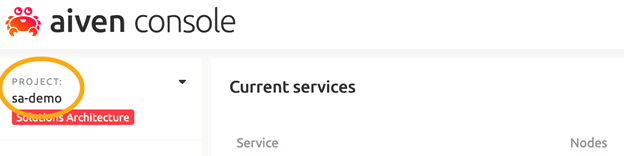
Note that I am using a project named ‘sa-demo’ and I want PostgreSQL v12.x instances.
Set your preferred cloud regions and number of replicas, as well as instance names in the __main__.py file:
Loading code...
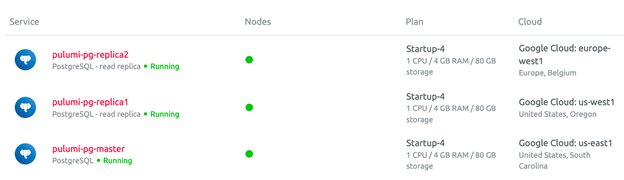
This will create a primary PG instance in the GCP us-east1 region, with a total of two read replicas (us-west1 and europe-west1).
*Supported regions/clouds for each service are listed on the pricing page. To create a 3rd read replica, add it to the replicas list.
*
Now we are ready to spin up our source on Aiven. Run the following in your terminal:
Loading code...
Select Yes to confirm the deployment.
After about 5 minutes or so, you should see that all of the resources have been created. The URLs and username/password combinations listed are needed to access the services. The influxdb_uri shown here is also added as an environment variable in the Lambda function, so that the Python client can connect to InfluxDB.
To see the new services, log into the Aiven console and verify that our three newly created resources are displayed:
Now we can load some data. Issue the following commands to run and test:
Loading code...
The commands above do two things:
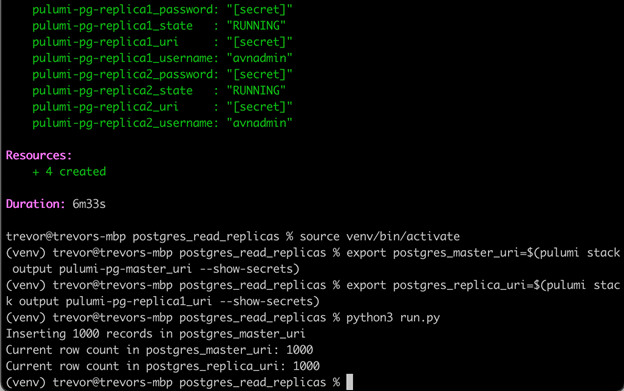
First we export the connection strings for our primary database and the first read replica (which are automatically assigned at deployment time) to local environmental variables using the pulumi stack output command.
Then we can run a Python script which will load 1000 fake ecommerce orders into the primary instance. Then it will read the row counts from both the primary and read replica, to demonstrate that both databases contain the same number of records.
Let’s tidy up and tear down our resources to save on costs (we can always deploy this again later).
Loading code...
All of the Pulumi specific code resides in main.py.The key to provisioning infrastructure on Aiven using Pulumi is to include the two Python libraries below:
Loading code...
Once you have done that, you can create a Postgres service by utilizing the Pg method with the associated parameters like this:
Loading code...
I have chosen to leverage a Pulumi Config to preclude having to hardcode settings.
To create the read replicas, we have to create a service integration by specifying the read_replica integration type and providing the name of the primary database instance.
Loading code...
Mock data is generated using the Faker package. The main.py program contains just two functions: one to insert some fake data into the master instance and the other to read the row count (on both the primary and a read replica). The generate_data routine also creates a table for us in the event that it does not exist. Check the file called schema.sql for details.
Loading code...
I connect to our instance using the popular Psycopg database adapter. This is a standard pattern for making database connections in Python. The only thing that I have to do differently is read the connection string from the environment variables that we previously set.
Loading code...
Here is the output displaying the row counts in both the primary and the first read replica:
Pulumi is a great option to provision cloud resources using the language of your choice. And Aiven makes it trivial to deploy Postgres instances in your preferred cloud and region. When you put these together, you have a powerful combination.
This same approach can be utilized for any Aiven services, including Aiven for Apache Kafka® and Aiven for MySQL®.
Your next step could be to check out Aiven for PostgreSQL® or Aiven for Apache Kafka®.
If you're not using Aiven services yet, go ahead and sign up now for your free trial at https://console.aiven.io/signup!
In the meantime, make sure you follow our changelog and RSS feeds or our LinkedIn and Twitter accounts to stay up-to-date with product and feature-related news.
Table of contents
$ cd aiven-examples/pulumi/postgres_read_replicas
$ python3 -m venv venv
$ source venv/bin/activate
$ pip install -r requirements.txt
$ pulumi config set aiven:apiToken XXXXXXXXXXXXXXXXXXXX --secret$ pulumi config set aiven_project sa-demo
$ pulumi config set plan_size startup-4
$ pulumi config set pg_version 12# Edit instance names, regions and # of read replicas as needed
primary = {'name': "pulumi-pg-master", 'region': "google-us-east1"}
replicas = [
{'name': "pulumi-pg-replica1", 'region': "google-us-west1"},
{'name': "pulumi-pg-replica2", 'region': "google-europe-west1"}
]$ pulumi upexport postgres_master_uri=$(pulumi stack output pulumi-pg-master_uri --show-secrets)
export postgres_replica_uri=$(pulumi stack output pulumi-pg-replica1_uri --show-secrets)
python3 run.py$ deactivate
$ pulumi destroy
$ pulumi stack rm <my-stack-name-here>import pulumi
import pulumi_aiven as aivenavn = aiven.Pg(instance_info['name'],
project=conf.require('aiven_project'),
cloud_name=instance_info['region'],
service_name=instance_info['name'],
plan=conf.require('plan_size'),
pg_user_config=user_config_args,
service_integrations=integrations
)# Specify the read replica service integration
aiven.ServiceServiceIntegrationArgs(
integration_type="read_replica",
source_service_name=instance.service_name
)if __name__ == "__main__":
generate_data("postgres_master_uri")
get_row_count("postgres_master_uri")
get_row_count("postgres_replica_uri")conn_string = os.getenv(service_uri)
conn = pg_connect(conn_string)
cursor = conn.cursor()
cursor.execute('select count(*) from fake_orders;')
count = cursor.fetchone()[0]
cursor.close()
print(f'Current row count in {service_uri}: {count}')'%3e%3cpath%20d='M4.02991%2017.5H0.297321V5.81641H4.02991V17.5ZM2.16161%204.22266C0.968304%204.22266%200%203.26172%200%202.10156C0%201.54297%200.229018%201.01172%200.634821%200.617188C1.04062%200.222656%201.59107%200%202.16161%200C2.73214%200%203.28259%200.222656%203.68839%200.617188C4.0942%201.01172%204.32321%201.54688%204.32321%202.10156C4.32321%203.26172%203.35491%204.22266%202.16161%204.22266ZM17.996%2017.5H14.2714V11.8125C14.2714%2010.457%2014.2433%208.71875%2012.3308%208.71875C10.3902%208.71875%2010.0929%2010.1914%2010.0929%2011.7148V17.5H6.36429V5.81641H9.9442V7.41016H9.99643C10.4946%206.49219%2011.7121%205.52344%2013.5281%205.52344C17.3049%205.52344%2018%207.94141%2018%2011.082V17.5H17.996Z'%20fill='white'%20/%3e%3c/g%3e%3cdefs%3e%3cclipPath%20id='clip0_1338_1747'%3e%3crect%20width='18'%20height='20'%20fill='white'%20/%3e%3c/clipPath%3e%3c/defs%3e%3c/svg%3e)

'%3e%3cpath%20d='M14.3517%201.875H17.1883L10.9928%208.75781L18.2812%2018.125H12.5758L8.10396%2012.4453L2.99325%2018.125H0.152623L6.77807%2010.7617L-0.208984%201.875H5.64102L9.67896%207.06641L14.3517%201.875ZM13.3553%2016.4766H14.9263L4.78521%203.4375H3.09771L13.3553%2016.4766Z'%20fill='white'%20/%3e%3c/g%3e%3cdefs%3e%3cclipPath%20id='clip0_1338_1751'%3e%3crect%20width='18'%20height='20'%20fill='white'%20/%3e%3c/clipPath%3e%3c/defs%3e%3c/svg%3e)