
'%3e%3cpath%20d='M4.02991%2017.5H0.297321V5.81641H4.02991V17.5ZM2.16161%204.22266C0.968304%204.22266%200%203.26172%200%202.10156C0%201.54297%200.229018%201.01172%200.634821%200.617188C1.04062%200.222656%201.59107%200%202.16161%200C2.73214%200%203.28259%200.222656%203.68839%200.617188C4.0942%201.01172%204.32321%201.54688%204.32321%202.10156C4.32321%203.26172%203.35491%204.22266%202.16161%204.22266ZM17.996%2017.5H14.2714V11.8125C14.2714%2010.457%2014.2433%208.71875%2012.3308%208.71875C10.3902%208.71875%2010.0929%2010.1914%2010.0929%2011.7148V17.5H6.36429V5.81641H9.9442V7.41016H9.99643C10.4946%206.49219%2011.7121%205.52344%2013.5281%205.52344C17.3049%205.52344%2018%207.94141%2018%2011.082V17.5H17.996Z'%20fill='white'%20/%3e%3c/g%3e%3cdefs%3e%3cclipPath%20id='clip0_1338_1747'%3e%3crect%20width='18'%20height='20'%20fill='white'%20/%3e%3c/clipPath%3e%3c/defs%3e%3c/svg%3e)

'%3e%3cpath%20d='M14.3517%201.875H17.1883L10.9928%208.75781L18.2812%2018.125H12.5758L8.10396%2012.4453L2.99325%2018.125H0.152623L6.77807%2010.7617L-0.208984%201.875H5.64102L9.67896%207.06641L14.3517%201.875ZM13.3553%2016.4766H14.9263L4.78521%203.4375H3.09771L13.3553%2016.4766Z'%20fill='white'%20/%3e%3c/g%3e%3cdefs%3e%3cclipPath%20id='clip0_1338_1751'%3e%3crect%20width='18'%20height='20'%20fill='white'%20/%3e%3c/clipPath%3e%3c/defs%3e%3c/svg%3e)


This Spring, the Apache Kafka community released version 4.2 with a “production-ready” Share Group feature. Also known as a “Kafka queue” people were eager to see this feature because it introduced elastic consumer scaling, individual message acknowledgments, and built-in "poison pill" handling; similar to what you'd find in traditional message brokers like RabbitMQ and ActiveMQ.
However, now it is officially called a Share Group, mostly because it is not strictly a queue. If you really need very strict “first in, first out” and exactly-once semantics - it already exists in Kafka as keyed partitions, but this can also feel…SLOW. Mostly because of the strict limit of one partition, one consumer, which creates a bottleneck for concurrent scaling.
But now, new Share Groups break this rule and introduce a new possibility, a new trade-off on the table. With a Share Group, relaxing requirements of a strict order, you get much faster consumption,control, and monitoring over individual messages as a bonus.
You can look at Share Groups as an electronic queue in a bank, where messages are clients of a bank, and operators are consumers: when a client (a message) arrives, the Kafka Broker gives it a queue number (an offset) that defines the processing order, but the speed of its processing depends on how many operators (consumers) are available currently and how busy they are. And similar to a queue in a bank, if your operator cannot solve a problem, you will be redirected to another operator, and to your disappointment, you will spend more time in the bank than you need. However, the system is more efficient and faster for everyone else. Let’s consider some applications well suited to the performance of Shared Groups:
Where Share Groups Shine
Migrating Legacy "Message Queue" Applications
Many companies started their event-driven journey with simple queue implementations such as RabbitMQ or ActiveMQ, but later, when they grew, switched to Kafka. Share Groups simplify the migration process, allowing them to reduce operation costs by removing legacy infrastructure, especially if higher throughput is needed.
Variable-Latency Task Processing
Behind a classic Kafka consumer is an assumption that processing each message takes approximately the same time. However, this is not always the case in practice. Imagine a topic that has URLs of images that need to be processed. Most of them are tiny and processing is fast, but there are always some users with tons of heavy images that take up all the GPU time on one single machine. With Share Groups, consumption will not be blocked by such events, and faster events keep being processed.
Consumer Cost Saving
It is an open secret that scaling up consumers is a complex task because of the consumer group rebalancing problem. The more consumers there are, the harder it is to add more; especially gradually, as it increases the likeliness of timeouts. With Share Groups, because messages are processed in a batch and delivery is reported individually, this heavy synchronization is not necessary and so adding and removing new consumers is much more reactive and faster. Ultimately, spinning up consumer resources exactly on demand saves money on infrastructure. Just remember that this elasticity comes with the trade-off we discussed earlier: relaxed ordering guarantees. Because of this, you won't be able to apply this scaling pattern to every workload, especially those that require strict, sequential processing. Do Share Groups sound like the right tool for the job, and you want to give it a try?
Key Considerations for Using Share Groups
Here are a few things to keep in mind.
Share Groups Use a Specific, Separate Kafka Client
This is the first thing to know before starting to use Share Groups. On the one hand, it is a good thing because there is a very small chance of breaking existing, tuned clients. Shared groups require a completely different client (the KafkaShareConsumer) working on the broker with a different Group Coordinator, which helps with application isolation during migration. On the other hand, currently, only a Java Share Group client is supported.
Tuning Message Distribution Efficiency
Indeed, Share Groups allow you to scale clients faster, but the default settings might not be efficient for high throughput. The default value for the share.acquire.mode config is batch_optimized, which allows clients to read more messages than max.poll.records strictly allows. By default, a Share Group tries to process 2000 messages in parallel, also called in-flight messages (controlled by share.partition.max.record.locks). Another default value is max.poll.records set to 500, which sets the maximum number of records in one batch. This means that only 4 clients (2000 / 500 = 4) can read messages efficiently during high load; the rest of the clients might wait for a batch of messages to fill in before processing more.
Reducing max.poll.records slightly and setting share.acquire.mode to record_limit helps to get a more predictable and evenly distributed load. Alternatively, you can increase share.partition.max.record.locks as a group config to increase the number of in-flight messages. Monitoring InFlightBatchCount and InFlightBatchMessageCount will help verify that consumption is distributed fairly.
Monitor Messages Individually: A Different Kind of Lag
If you want to scale consumers efficiently, you naturally need to monitor lag. For a classical consumer, lag is simply the difference between produced and consumed messages. Since strict order is not guaranteed in Share Groups, the amount of messages already consumed—regardless of order—is the main driver of the lag metric.
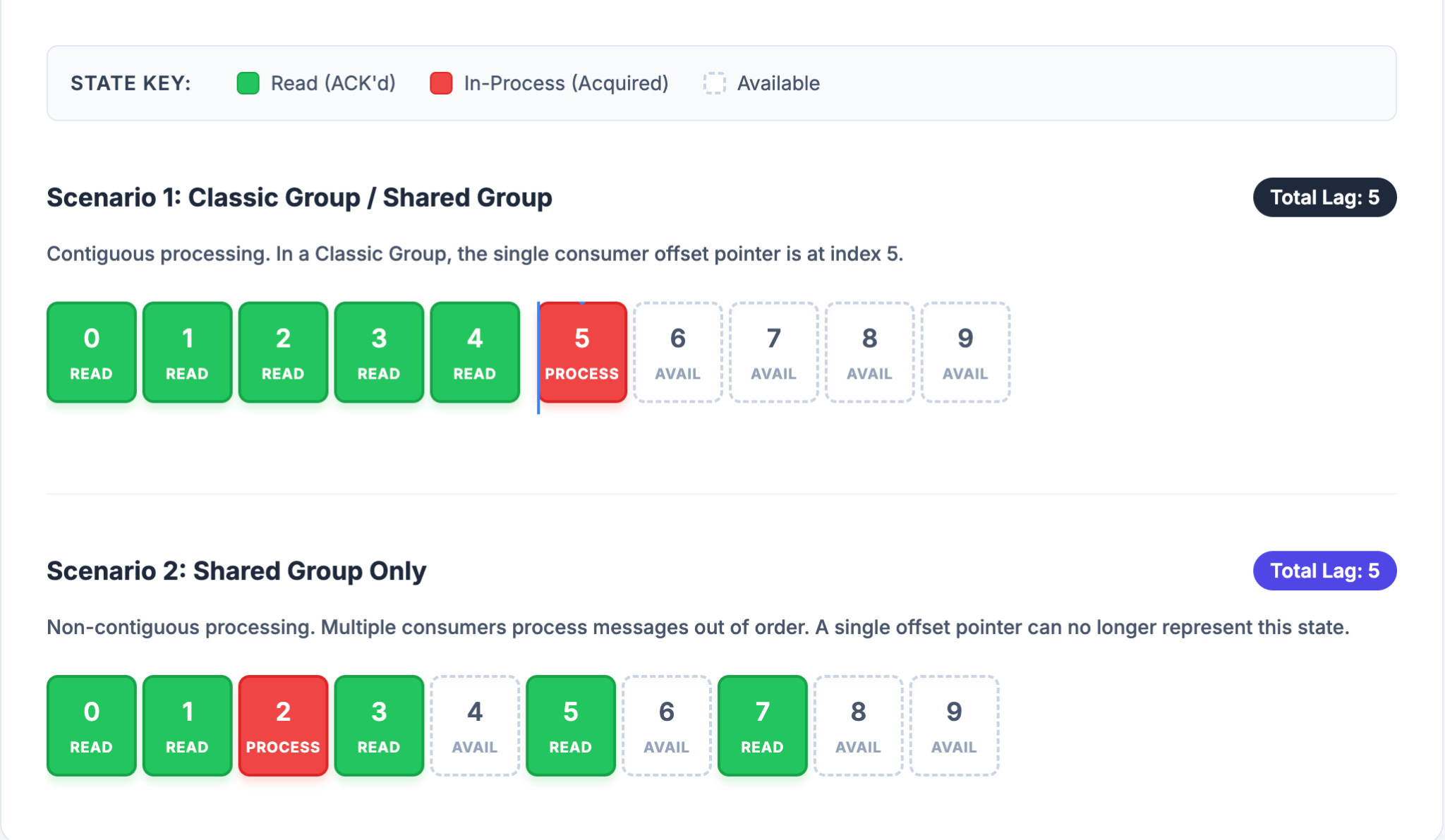
To check lag, you can use the built-in command-line tool:
kafka-share-groups.sh --group [GROUP_NAME] --describe
However, more detailed and advanced monitoring tooling is not available yet. So, it is a good idea to track problematic messages on the client side by checking if deliveryCount() > 1 for each ConsumerRecord.
Ready to get started?
Enable the Share Group rebalancing protocol in your broker on Aiven Platform under Service settings > Advance Configuration and set kafka.group_coordinator_rebalance_protocols = classic,consumer,share.
Check out this AI Agentic skill to create a Share Group consumer from a template.
