
'%3e%3cpath%20d='M4.02991%2017.5H0.297321V5.81641H4.02991V17.5ZM2.16161%204.22266C0.968304%204.22266%200%203.26172%200%202.10156C0%201.54297%200.229018%201.01172%200.634821%200.617188C1.04062%200.222656%201.59107%200%202.16161%200C2.73214%200%203.28259%200.222656%203.68839%200.617188C4.0942%201.01172%204.32321%201.54688%204.32321%202.10156C4.32321%203.26172%203.35491%204.22266%202.16161%204.22266ZM17.996%2017.5H14.2714V11.8125C14.2714%2010.457%2014.2433%208.71875%2012.3308%208.71875C10.3902%208.71875%2010.0929%2010.1914%2010.0929%2011.7148V17.5H6.36429V5.81641H9.9442V7.41016H9.99643C10.4946%206.49219%2011.7121%205.52344%2013.5281%205.52344C17.3049%205.52344%2018%207.94141%2018%2011.082V17.5H17.996Z'%20fill='white'%20/%3e%3c/g%3e%3cdefs%3e%3cclipPath%20id='clip0_1338_1747'%3e%3crect%20width='18'%20height='20'%20fill='white'%20/%3e%3c/clipPath%3e%3c/defs%3e%3c/svg%3e)

'%3e%3cpath%20d='M14.3517%201.875H17.1883L10.9928%208.75781L18.2812%2018.125H12.5758L8.10396%2012.4453L2.99325%2018.125H0.152623L6.77807%2010.7617L-0.208984%201.875H5.64102L9.67896%207.06641L14.3517%201.875ZM13.3553%2016.4766H14.9263L4.78521%203.4375H3.09771L13.3553%2016.4766Z'%20fill='white'%20/%3e%3c/g%3e%3cdefs%3e%3cclipPath%20id='clip0_1338_1751'%3e%3crect%20width='18'%20height='20'%20fill='white'%20/%3e%3c/clipPath%3e%3c/defs%3e%3c/svg%3e)


TL;DR
-
Getting Kafka data into ClickHouse uses a three-part pipeline: a Kafka engine table consumes the topic, a materialized view moves the data, and a MergeTree table is what actually gets queried.
-
ClickHouse's materialized view isn't a query you read from, it's an insert trigger that fires on each block of incoming rows and writes the result into a separate destination table.
-
The Kafka engine table doesn't consume anything until something depends on it, so creating the materialized view is what actually starts the consumer's poll loop.
-
Offsets commit after the insert, giving at-least-once delivery, so duplicates are possible and a
ReplicatedMergeTreedestination can help deduplicate identical blocks. -
A ClickHouse primary key isn't a uniqueness constraint like in Postgres, it defines how rows are sorted on disk and should match query patterns rather than identify individual records.
Kafka is brilliant at moving events around, but sooner or later someone wants to actually query those events, perhaps aggregations, dashboards, or ad-hoc analytics over billions of rows. That is where ClickHouse comes in. It's the option for when stream processing is more than you need, but warehouse query latency is more than you'll tolerate. It’s an open-source column store built for fast analytical reads, and it sits naturally downstream of Kafka, the two forming a clean, fully open source pipeline for processing event data. Kafka moves the stream, ClickHouse makes it queryable. So when I started reading up on ClickHouse, the obvious first move was to build a demo wiring a Kafka topic into it and watch the data land. A lot of my streaming instincts carried over, but several were flawed assumptions.
Here are all the things that tripped me up while trying to get a Kafka topic’s data into ClickHouse.
The setup looks familiar, until this one word
ClickHouse reads from Kafka with a three-part pipeline: a table backed by the Kafka engine consumes the topic, a materialized view moves the data across, and a table (MergeTree table) is where it actually lands and gets queried.
Loading code...
The Kafka engine table joins a consumer group, the one named in its Kafka(...) settings, so this feels familiar. However, when you hit the words "materialized view" you've now probably been led astray.
1. The materialized view is not a view
Coming from Flink, or honestly any SQL engine, a view is a query you read from: a continuously updated result you can SELECT against. In a previous post about getting started with Flink, a VIEW like items_per_cart always reflected the current state of the stream. That's stream-table duality, and it's a clear mental model.
ClickHouse's materialized view is not quite that. It's an insert trigger. It doesn't store a query result you go and refresh; it fires on each block (a ClickHouse concept for a collection of data to be inserted) of rows inserted into its source table, runs its SELECT over just that block, and writes the output into a separate destination table (the one named in the TO clause). You never query the MV itself. You query the destination. Same two words, almost the opposite behaviour. This is a key part of the ClickHouse design philosophy, shifting the computation from query time to insert time. This makes sense as the technology emerged from building Yandex Metrica, a Google Analytics like product. It's expected to ingest huge volumes of data (think millions of rows per second) while still answering queries in milliseconds.
The MV isn't a live query sitting over the stream, it's glue that runs at write time. That write-time angle is also how ClickHouse lets you pre-aggregate as data arrives. Pair an MV with a different table type like AggregatingMergeTree and the rollups are maintained on insert. Out of scope for this simple copy-through example, but worth knowing it's there.
2. Nothing happens until you attach the view
This is the one that confused me for longer than I care to admit. I created the Kafka engine table, pointed it at a populated topic, and… nothing. No consumption, no offsets moving, no errors. Just an OK. response from the CLI. 😐
The thing is, the Kafka table doesn't consume anything on its own. On creation it checks whether anything depends on it. In this case, it finds nothing depends on it, and goes back to sleep. Creating the materialized view is what registers a dependency, and that is what starts the background poll loop: pull a batch, push it through the view into the destination, commit the offset, repeat.
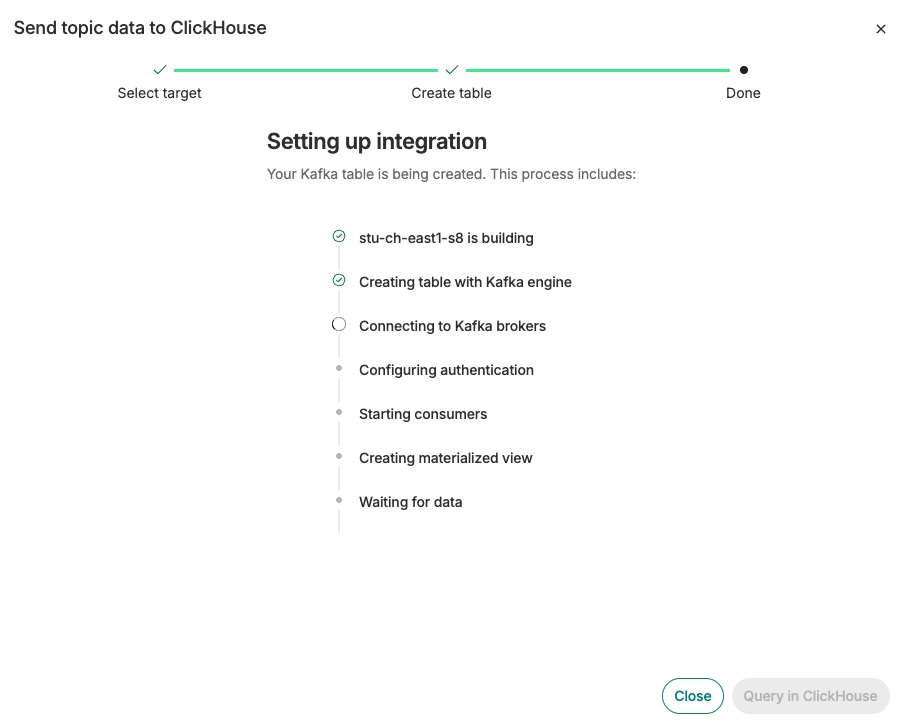
So in ClickHouse, consumption is dependency-driven, not creation-driven. This is more clearly visible when having the connection setup for you, like you can build on Aiven. On Aiven the wizard quietly exposes this: its progress checklist creates the Kafka-engine table first, then "Creating materialized view", then "Waiting for data", in that order.
One Kafka habit that does carry over cleanly: the offset is committed after the insert, so delivery is at-least-once. This pipeline requires planning for the occasional duplicate, but you can always consider a ReplicatedMergeTree destination to help dedupe identical blocks.
3. The primary key isn't what you think it is
This one isn't really a Kafka thing. It's a "coming from Postgres" thing, and it catches almost everyone new to ClickHouse. Understanding primary keys in ClickHouse is … key.
I originally assumed a primary key meant uniqueness. It does not. There's no constraint and no enforcement; you can insert the same key a million times and ClickHouse won't blink.
A ClickHouse primary key defines how rows are sorted on disk and builds a sparse index over those sorted rows. (Technically you can declare PRIMARY KEY separately, but it defaults to your ORDER BY columns and is almost always the same thing, not the point here.) It's a tool for making range scans fast, not for identifying a row. So you choose it to match how you query, the columns you filter and group by, not how you'd uniquely identify a record. Get it wrong and queries scan far more than they should; get it right and ClickHouse feels, as it is meant to, crazy fast. Choosing an ordering key is therefore important, I understood this more deeply after reading the Aiven docs on this exact subject.
The pattern behind the surprises
None of this is ClickHouse being weird for the sake of it. It's a column store built for cheap inserts and fast analytical reads, and each surprise falls out of that design once you stop projecting OLTP and stream-processing definitions onto familiar-looking words. The trigger-style "view", the deferred consumption, the sort-key "primary key", they're all consistent once you see the shape of the thing.
If you come from Kafka, you already have most of the instincts you need to get data flowing. Just hold them loosely. The words are the same, the behaviour isn't.
Getting started with ClickHouse can be tricky, but it doesn’t need to be: check out the Aiven ClickHouse documentation to get started.
