
'%3e%3cpath%20d='M4.02991%2017.5H0.297321V5.81641H4.02991V17.5ZM2.16161%204.22266C0.968304%204.22266%200%203.26172%200%202.10156C0%201.54297%200.229018%201.01172%200.634821%200.617188C1.04062%200.222656%201.59107%200%202.16161%200C2.73214%200%203.28259%200.222656%203.68839%200.617188C4.0942%201.01172%204.32321%201.54688%204.32321%202.10156C4.32321%203.26172%203.35491%204.22266%202.16161%204.22266ZM17.996%2017.5H14.2714V11.8125C14.2714%2010.457%2014.2433%208.71875%2012.3308%208.71875C10.3902%208.71875%2010.0929%2010.1914%2010.0929%2011.7148V17.5H6.36429V5.81641H9.9442V7.41016H9.99643C10.4946%206.49219%2011.7121%205.52344%2013.5281%205.52344C17.3049%205.52344%2018%207.94141%2018%2011.082V17.5H17.996Z'%20fill='white'%20/%3e%3c/g%3e%3cdefs%3e%3cclipPath%20id='clip0_1338_1747'%3e%3crect%20width='18'%20height='20'%20fill='white'%20/%3e%3c/clipPath%3e%3c/defs%3e%3c/svg%3e)

'%3e%3cpath%20d='M14.3517%201.875H17.1883L10.9928%208.75781L18.2812%2018.125H12.5758L8.10396%2012.4453L2.99325%2018.125H0.152623L6.77807%2010.7617L-0.208984%201.875H5.64102L9.67896%207.06641L14.3517%201.875ZM13.3553%2016.4766H14.9263L4.78521%203.4375H3.09771L13.3553%2016.4766Z'%20fill='white'%20/%3e%3c/g%3e%3cdefs%3e%3cclipPath%20id='clip0_1338_1751'%3e%3crect%20width='18'%20height='20'%20fill='white'%20/%3e%3c/clipPath%3e%3c/defs%3e%3c/svg%3e)


Every time your app asks the database 'does this row exist,' it pays the cost of a database query to get back 'no'.
What is Valkey Bloom?
Valkey Bloom ships as a plugin included and enabled with Aiven for Valkey on version 9.0 and higher. Valkey Bloom filters give you a way to cut most database miss queries by sending them first to an in-memory lookup.
A bloom filter is a small, probabilistic data structure designed to answer one question: "Have I seen this item before?" It provides two potential answers: Absolutely Not, and Probably.
You may think that 100% Yes or No would be better but here’s the thing, probably is really fast and you’re really concerned about the Absolutely Not’s taking up unnecessary connections.
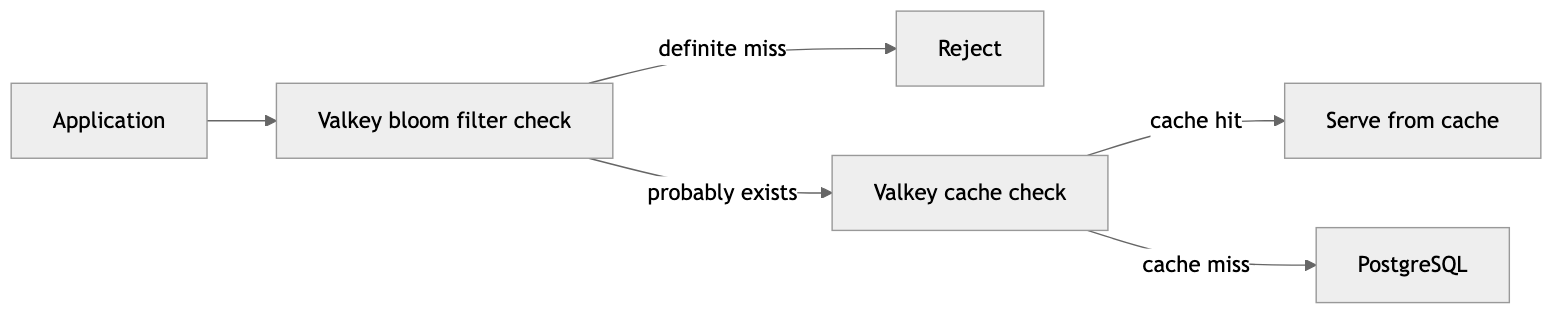
Each layer catches what the previous one missed: the bloom filter rejects the cheapest misses without a database query, the cache serves repeat hits from popular items, and PostgreSQL only sees queries that have a real chance of returning data and it’s only hit a fraction of the time and for things like updates (like when inventory is adjusted or transactions happen).
Setting Up A Bloom Filter
Reserve a filter with a target false-positive rate and expected capacity. For 10 million active item numbers at a 0.1% false-positive rate:
Loading code...
Seems like a lot. It’s actually about 25MB of space.
Loading code...
Populating from PostgreSQL
You can now populate your bloom filter using the data in your PostgreSQL database. Batch insert the item numbers as rows stream with 1000 items per call. Below would be the actual commands run in Valkey.
Loading code...
The cleanest way to do this is a script that pulls from PostgreSQL in batches and streams them into Valkey.
Loading code...
Bloom Filter in Action
The application's read path goes through all three layers. We run BF.EXISTS to check an item number.
Loading code...
If this returns 0, the item is definitely not in the catalog. The application returns "not found" immediately.
If it returns 1, the item probably exists, and we proceed to the cache:
Loading code...
On a cache hit, we're done. The information is returned and the process can continue without reaching the database.
On a cache miss, we fall through to PostgreSQL:
Loading code...
If PostgreSQL returns nothing, we just hit a bloom filter false positive. This happens about once every 100,000 requests based on our settings. That's 99,999 unnecessary database queries avoided for every one false positive that gets through.
Lastly, we cache the information so that any further requests in our time-to-live (TTL) are picked up by Valkey, saving more queries against the database.
Loading code...
That EX 300 gives the cache entry a 5-minute TTL, which is plenty of time to absorb a burst of repeat lookups for the same item.
Repopulating the data
Data changes and we don’t want to keep the same bloom filter forever or the number of false positives will go up.
The cleanest pattern is a periodic rebuild from PostgreSQL into a fresh filter, then atomic swap. This will be very similar to our initial loading script but will load data into a temp filter (taking up another 25MB of space).
Loading code...
This loads fresh data into a new filter bf:items:rebuild and then we overwrite the old filter with the rename.
Before You Ship
Bloom filters are great but you can definitely mess things up. The issues below are the ones that actually bite people.
Bloom filters aren’t automatic.
That also means that items added to PostgreSQL won't appear in the bloom filter. Make sure that you refresh your filters on a regular basis.
Bloom filters don't support deletion. Once an item is added, it's there until you rebuild the filter from scratch. This is why making this a script to run on a schedule vs a regular command is important.
Solution: If your data is changing too quickly for bloom filters to stay accurate, opt for a regular caching strategy with a time-to-live (TTL) that is appropriate for the change in data.
BF.RESERVE is important.
BF.RESERVE commits you to a capacity and error rate. Pushing past the reserved capacity and the false-positive rate climbs.
Solution: Include plenty of headroom in your reserved space. The default memory limit for bloom filter is 128MB and that can hold 50 million items in a filter. Also you can monitor your bloom filter with BF.INFO.
Loading code...
This returns capacity, size, number of items inserted, and expansion rate — useful for alerting before you blow past the reserved capacity.
Atomic swap is non-negotiable.
Don't DEL the live filter and re-populate; there will be a window where every lookup returns "definitely not" and your application will think every ID is invalid which, depending on how long the rebuild process is, could be a problem.
SOLUTION: Always build into a temp key and RENAME to swap.
UPDATE: Using RENAME in a cluster, both bf:itemsCROSSSLOT error. Without hash tags, they very likely won't.
The fix is to use bf:{items} and bf:{items}:rebuild.
Persistence has caveats.
Bloom filters persist with normal Valkey snapshot (RDB)/append-on-write (AOF) settings, but a cold start on a fresh node means an empty filter until reload completes (that includes replicas).
Solution: You need to make sure that you work around your bloom being empty or not existing that way you don’t have downtime if you need to drop or rebuild the bloom from scratch.
Wrapping Up
Bloom filters exist to keep wasted requests away from your database. There are other use cases like deduplication and fraud/spam detection. If you find yourself querying your database against mostly static information, a bloom filter is the right tool.
