
'%3e%3cpath%20d='M4.02991%2017.5H0.297321V5.81641H4.02991V17.5ZM2.16161%204.22266C0.968304%204.22266%200%203.26172%200%202.10156C0%201.54297%200.229018%201.01172%200.634821%200.617188C1.04062%200.222656%201.59107%200%202.16161%200C2.73214%200%203.28259%200.222656%203.68839%200.617188C4.0942%201.01172%204.32321%201.54688%204.32321%202.10156C4.32321%203.26172%203.35491%204.22266%202.16161%204.22266ZM17.996%2017.5H14.2714V11.8125C14.2714%2010.457%2014.2433%208.71875%2012.3308%208.71875C10.3902%208.71875%2010.0929%2010.1914%2010.0929%2011.7148V17.5H6.36429V5.81641H9.9442V7.41016H9.99643C10.4946%206.49219%2011.7121%205.52344%2013.5281%205.52344C17.3049%205.52344%2018%207.94141%2018%2011.082V17.5H17.996Z'%20fill='white'%20/%3e%3c/g%3e%3cdefs%3e%3cclipPath%20id='clip0_1338_1747'%3e%3crect%20width='18'%20height='20'%20fill='white'%20/%3e%3c/clipPath%3e%3c/defs%3e%3c/svg%3e)

'%3e%3cpath%20d='M14.3517%201.875H17.1883L10.9928%208.75781L18.2812%2018.125H12.5758L8.10396%2012.4453L2.99325%2018.125H0.152623L6.77807%2010.7617L-0.208984%201.875H5.64102L9.67896%207.06641L14.3517%201.875ZM13.3553%2016.4766H14.9263L4.78521%203.4375H3.09771L13.3553%2016.4766Z'%20fill='white'%20/%3e%3c/g%3e%3cdefs%3e%3cclipPath%20id='clip0_1338_1751'%3e%3crect%20width='18'%20height='20'%20fill='white'%20/%3e%3c/clipPath%3e%3c/defs%3e%3c/svg%3e)

TL;DR
- The Valkey Search module lets you add full-text, tag, numeric, and vector search directly on top of existing cached data in Aiven for Valkey, without a separate datastore.
- Once an index is declared over a key prefix, every existing Hash is backfilled automatically and every future HSET updates the index, with no separate insert step needed.
- Vector search runs similarity queries alongside structured fields in the same query, using either FLAT (exact but slower at scale) or HNSW (approximate, around 99% recall at millisecond speed on millions of vectors) indexing.
- A new vector index can be added over the same key prefix as an existing text index, so both indexes watch the same data and the original keeps serving traffic while the new one backfills.
- The search module is available on every Aiven for Valkey plan starting with Valkey 9.0, making the same cache used for hot-path reads also queryable with hybrid text, tag, numeric, and vector filters.
Aiven for Valkey includes the Valkey Search module setup and ready to go. Here's what that looks like in practice: a small online shop adding real search on top of the cache it's already running.
Needle & Yarn sells the yarn you crochet with (skeins) and the design patterns you crochet from. Like a lot of e-commerce backends, it already runs Valkey as a product cache, with each product stored as a Hash for hot-path performance.
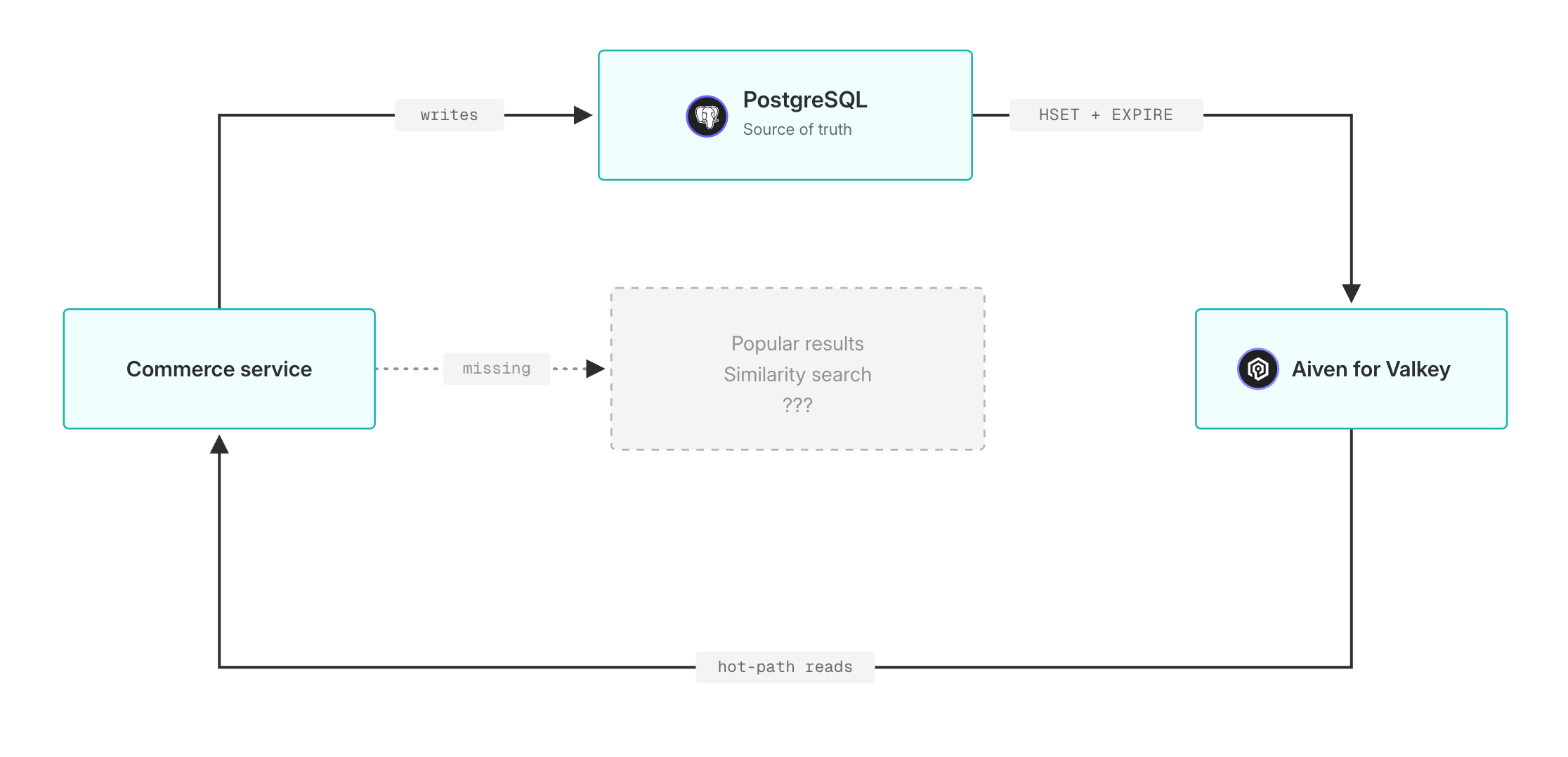
The team wants to surface popular designs and skeins by recent traffic and saves. Adding a search index to the cache they're already running gets them all of this without a new datastore.
Note: the examples below use native Valkey command syntax, the same shape you'll see in the docs. A runnable Python tutorial that wraps everything in a flask app running with valkey-py lives in valkey-search-poc/.
The cache Needle & Yarn already runs
Needle & Yarn's commerce backend caches each design as a Hash under design:<id>.
Loading code...
Two signals live on every record. favorites counts customers who've saved the pattern, a measure of long-lived intent. page_views counts views in the recent window, short-lived intent. Only favorites come from PostgreSQL, the parent database.
Each Hash carries a TTL that's refreshed on every update.
Loading code...
Records in active use stay in the cache and the index; records nobody touches for a day fall out automatically. No background sweep, no manual cleanup.
Skeins live in the same Valkey instance under skein:<id> with their own product fields and the same TTL pattern:
Loading code...
Declare an index over the cache
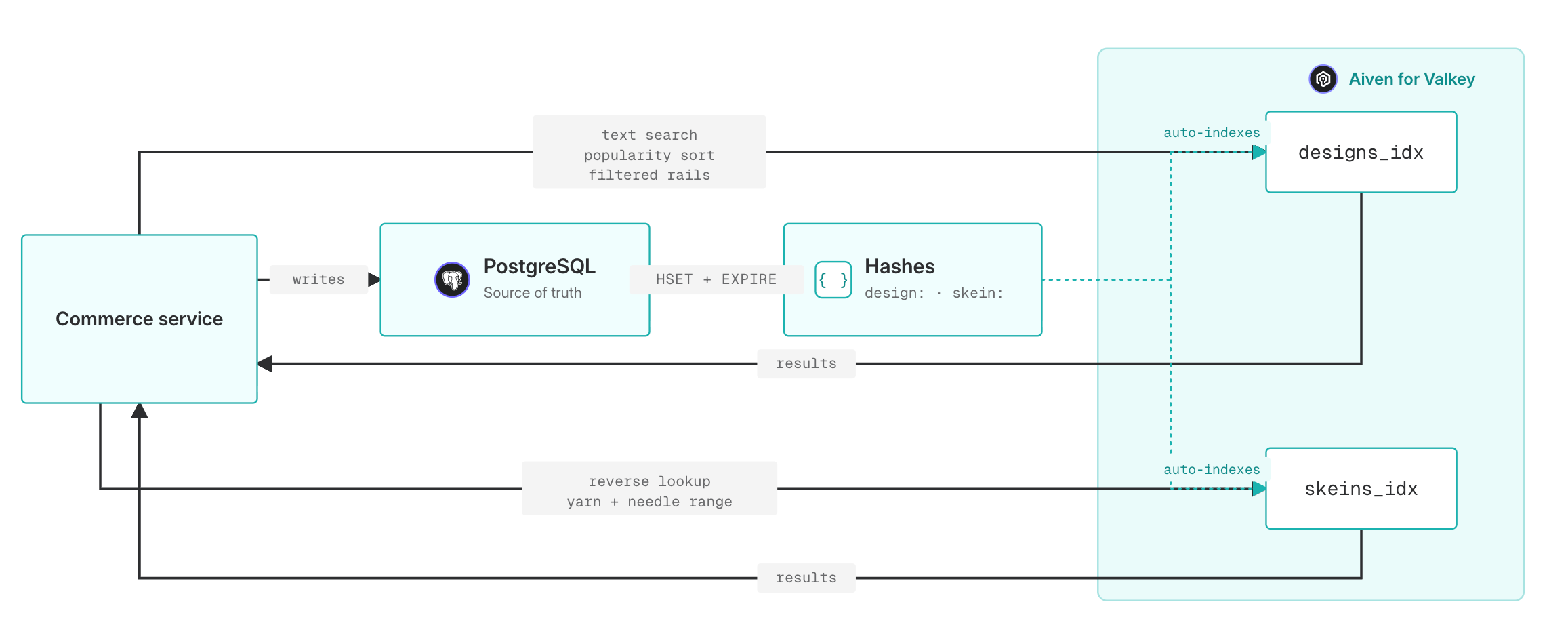
A Valkey Search index describes which keys to watch and which fields to make queryable. The schemas use four field types: TEXT for full-text fields, TAG for exact-match filters, NUMERIC (with SORTABLE) for range and sort, and VECTOR, which we'll get to.
Once an index exists, every existing Hash matching the prefix is backfilled into the index, and every future HSET updates it automatically. There's no separate "insert into the index" call.
Loading code...
And the parallel index over the skein cache:
Loading code...
A few queries to set the scene
FT.SEARCH covers the obvious shapes: text, tag, numeric, and hybrid filters.
A customer searches the catalog for "cardigan":
Loading code...
The editorial team builds an "advanced picks" rail, high-difficulty patterns rated 4.5 or higher, sorted by saves:
Loading code...
A "trending now" rail uses the short-window signal, top designs by recent traffic:
Loading code...
Skeins follow the same pattern, and the reverse lookup falls out for free. Given a design that calls for worsted-weight yarn around a 5mm hook, find skeins that match: needle range covering 5mm, in stock, sorted by price:
Loading code...
And the other direction: given a skein the customer just bought (worsted, oatmeal), find designs that work with it:
Loading code...
This isn't trying to replace Postgres FTS or a dedicated OpenSearch index; it gives you similar functionality over data you're already keeping hot in Valkey, with the structured fields you already index for caching purposes.
Vector search
The vector layer is the part of Valkey Search that's hard to replicate elsewhere without standing up a separate system. It runs similarity search next to those same structured fields, on data that's already in the cache.
This is what answers "what else looks like this?": similarity by meaning rather than exact match. Valkey Search treats a vector as another field type alongside TEXT, TAG, and NUMERIC, and lets you mix all of them in one query.
Two index algorithms are available. FLAT is brute-force exact K-Nearest Neighbor: perfect accuracy, slower as the dataset grows. Use it when the dataset is small or accuracy matters more than latency. HNSW is approximate, around 99% recall at milliseconds on millions of vectors. Use it when scale matters. Same query syntax either way; only the index changes. We'll use HNSW.
The example below shows the migration shape: an existing designs_idx is already serving traffic, and the team wants to add similarity search without dropping and rebuilding. Standing up a parallel vector index over the same key prefix means both indexes watch design:*, both see every HSET, and the basic one keeps serving while the new one backfills.
Loading code...
The 6 after the algorithm name is the count of arguments that follow (not the vector dimension). We're declaring three attribute pairs (TYPE FLOAT32, DIM 384, DISTANCE_METRIC COSINE), which is six args total. The actual vector dimension is DIM 384, matching the output of sentence-transformers' all-MiniLM-L6-v2. Different models produce different sizes: OpenAI's text-embedding-3-small is 1536, Voyage's voyage-3-large is 1024, and so on. Set DIM to whatever your model produces.
Generating the embedding
The application has to produce the vector before it writes the design. With sentence-transformers in Python:
Loading code...
The query takes a prefilter before the =>[KNN ...] clause. * means no filter; replace it with any tag, numeric range, or text expression to narrow the candidate set first:
Loading code...
The rest of the syntax stays the same. PARAMS 2 vec <bytes> passes the query vector (the 2 is the argument count: one name, one value). DIALECT 2 enables the =>[KNN ...] syntax and must be set per query. That second query is how Needle & Yarn builds "designs like this one, in the yarn weight you're already shopping for" in a single round trip.
Where else this pattern fits
Needle & Yarn is a yarn shop, but the shape (cache plus index plus popularity counters plus similarity vectors) applies elsewhere. A few places it comes up regularly.
Internal AI assistants over private data work exactly this way: cache a corpus of docs as Hashes, add embeddings, expose FT.SEARCH as a tool. Customer support has two obvious fits: past tickets like this one, and KB articles relevant to this issue. Recency matters here too. When a new bug surfaces, an automated answer can resolve it everywhere at once rather than being handled ticket by ticket.
In-product "find similar" features follow the same structure regardless of domain: similar-document recommendations in a CMS, similar-account suggestions for a CSM, similar-incident lookup in an ops console. Hybrid filters over rapidly-changing fields are where a dedicated search engine tends to fall behind. Live inventory, dynamic pricing, current promo eligibility, in-flight order status: these all update too fast for an external index but stay searchable and accurate when the cache is also the index.
Anomaly detection and deduplication at ingestion are a less obvious fit but work well. Incoming user-generated content (reviews, comments, leads, abuse reports) checked against the existing corpus by semantic similarity catches near-duplicates that hand-tuned rules miss.
In each case, data that's already hot in Valkey for performance reasons gets indexed in place, with vector and structured fields combinable in one query.
If you're running Aiven for Valkey, the search module is available on every plan. Upgrade to Valkey 9.0, index your existing data fields, and start querying with vectors and hybrid filters today.
