
'%3e%3cpath%20d='M4.02991%2017.5H0.297321V5.81641H4.02991V17.5ZM2.16161%204.22266C0.968304%204.22266%200%203.26172%200%202.10156C0%201.54297%200.229018%201.01172%200.634821%200.617188C1.04062%200.222656%201.59107%200%202.16161%200C2.73214%200%203.28259%200.222656%203.68839%200.617188C4.0942%201.01172%204.32321%201.54688%204.32321%202.10156C4.32321%203.26172%203.35491%204.22266%202.16161%204.22266ZM17.996%2017.5H14.2714V11.8125C14.2714%2010.457%2014.2433%208.71875%2012.3308%208.71875C10.3902%208.71875%2010.0929%2010.1914%2010.0929%2011.7148V17.5H6.36429V5.81641H9.9442V7.41016H9.99643C10.4946%206.49219%2011.7121%205.52344%2013.5281%205.52344C17.3049%205.52344%2018%207.94141%2018%2011.082V17.5H17.996Z'%20fill='white'%20/%3e%3c/g%3e%3cdefs%3e%3cclipPath%20id='clip0_1338_1747'%3e%3crect%20width='18'%20height='20'%20fill='white'%20/%3e%3c/clipPath%3e%3c/defs%3e%3c/svg%3e)

'%3e%3cpath%20d='M14.3517%201.875H17.1883L10.9928%208.75781L18.2812%2018.125H12.5758L8.10396%2012.4453L2.99325%2018.125H0.152623L6.77807%2010.7617L-0.208984%201.875H5.64102L9.67896%207.06641L14.3517%201.875ZM13.3553%2016.4766H14.9263L4.78521%203.4375H3.09771L13.3553%2016.4766Z'%20fill='white'%20/%3e%3c/g%3e%3cdefs%3e%3cclipPath%20id='clip0_1338_1751'%3e%3crect%20width='18'%20height='20'%20fill='white'%20/%3e%3c/clipPath%3e%3c/defs%3e%3c/svg%3e)

In the modern data landscape, the choice between managed services and infrastructure control is often presented as a trade-off. However, with Aiven Bring Your Own Cloud (BYOC), organizations no longer have to choose between the ease of a managed service, the security of their own VPC, and the sovereignty of their own data. Additionally, BYOC offers the potential financial benefit of using the "Committed Used Discounts" and avoiding hidden data egress transfer fees if they have to send the data to non-BYOC solutions such as Confluent Cloud.
Understanding the shared responsibility model
Under the BYOC model Aiven manages the OS and Kafka software lifecycle within your existing GCP project while you maintain ownership of the underlying GCP infrastructure.
Aiven operates within your environment by impersonating a Privilege-Limited Service Account. This account is strictly limited to the compute, networking, and storage resources required to run your managed services. It possesses no long-lived credentials and cannot access billing, IAM, or other unrelated projects, providing a clean "least-privilege" security model.
Below are the steps when executed by both sides in the shared responsibility view.
Table 1. Shared Responsibility Table
| Steps | Customer | Aiven |
|---|---|---|
| 1 | Request BYOC Feature | |
| 2 | Enable BYOC Feature | |
| 3 | Prepare GCP: Roles, API, Token for GCloud | |
| 4 | Start BYOC Enablement using Aiven Console or CLI | |
| 5 | Generate TerraForm Script Template | |
| 6 | Apply TerraForm Script Template | |
| 7 | Submit Generated Service Account ID to Aiven | |
| 8 | Create BYOC VPC etc | |
| 9 | Assign Projects | |
| 10 | Install Services |
Architecting the security foundation for BYOC on GCP
The BYOC security foundation is under the bigger system architecture shown below.
Diagram 1. Aiven BYOC System Architecture
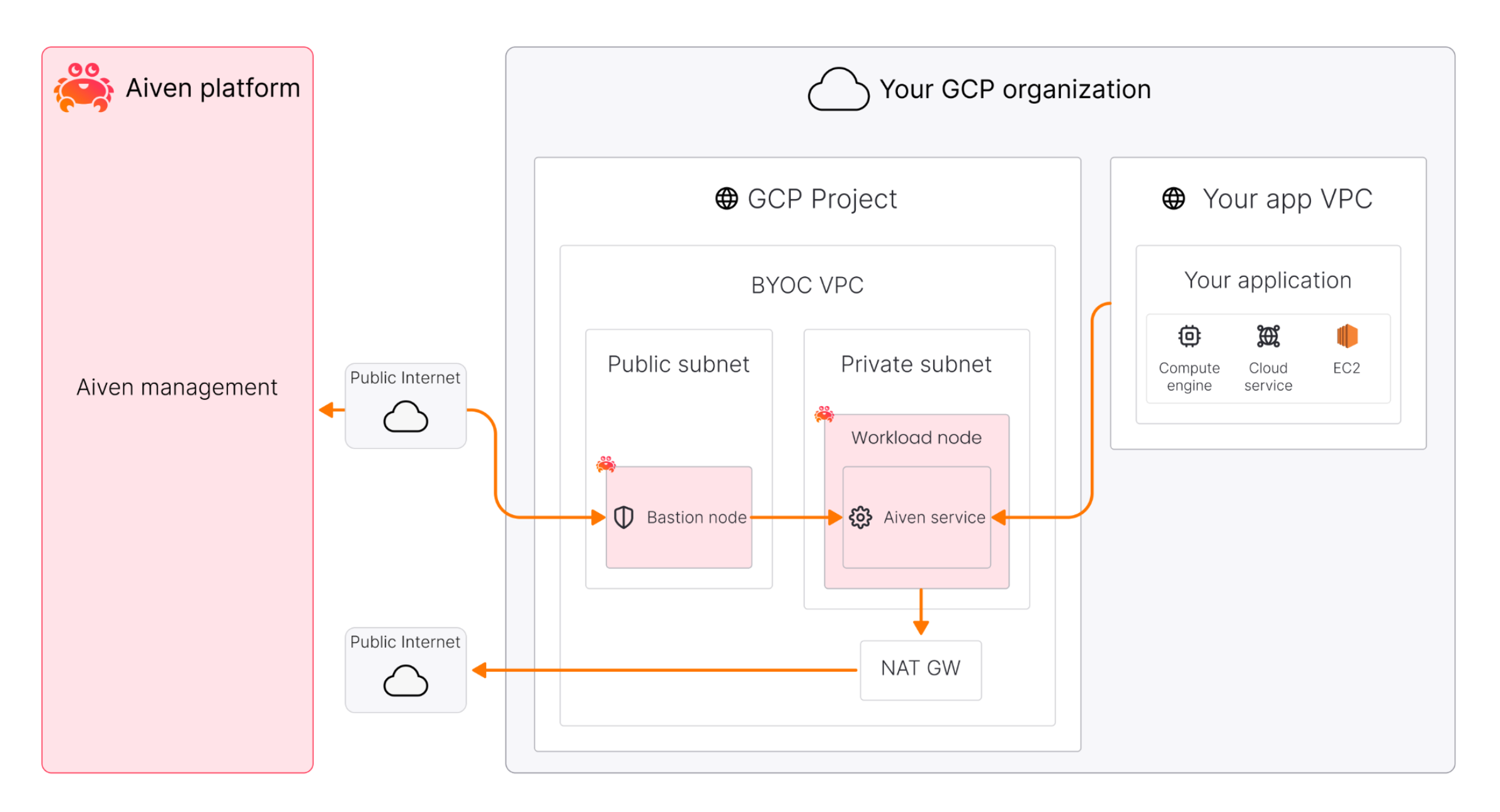
Your GCP project must be prepared to host the Aiven ecosystem. This involves the design and preparation of two identities.
- The Bootstrap Identity, used by your cloud admin or GCP project owner, with greater privilege to create resources such as VPC and Compute nodes, create another service account such as the below less privileged service account, and manage networks such as subnets and firewalls.
- The less privileged identity, also called Privilege-Limited Service Account, created by the Bootstrap Identity, intended to be used by Aiven to manage Aiven services in the BYOC. This Privilege-Limited Service Account does not use any long-lived credentials and the privilege can be revoked at any time. Further, every activity can be logged via GCP Cloud Audit Logs.
The Bootstrap Identity, typically using either a user account with owner rights to the target project, or a temporary service account that can be discarded after creation for security reasons.
Before deploying, ensure your Bootstrap Identity is equipped with the necessary roles, APIs and credentials. This includes 5 roles, 4 APIs, and 1 access token for GCP CLI.
The roles that Bootstrap Identity needs temporarily in order to set up BYOC in the bootstrap process are for these purpose:
- Compute and networking:
roles/compute.adminis essential to provision the VPCs, subnets, firewall rules that house your Kafka brokers. - Identity management:
roles/iam.serviceAccountAdminandroles/iam.securityAdminallow for the creation and secure binding of the privilege-limited service account intended for Aiven to use. - Access management:
roles/resourcemanager.projectIamAdminis required to attach IAM policies at project scope. - Service enablement:
roles/serviceusage.serviceUsageAdminis necessary to enable service APIs such as Compute, IAM, etc.
The 4 APIs that the creation process needs are below. They must be enabled using the gcloud services enable command to allow automated orchestration.
compute.googleapis.comiam.googleapis.comcloudresourcemanager.googleapis.comserviceusage.googleapis.com
The access token is intended to be used to run the TerraForm script. This reference implementation assumes Application Default Credentials using the active gcloud user by issuing: gcloud auth application-default login command. The terraform script is created by Aiven after you provide configuration through Aiven console and downloaded and applied by you defined by the Shared Responsibility Table step 5 and step 6.
Step by step BYOC creation
Below are the example screenshots to configure BYOC on the Aiven management console. However, it is also possible to do the same using the two command lines:
Loading code...
Loading code...
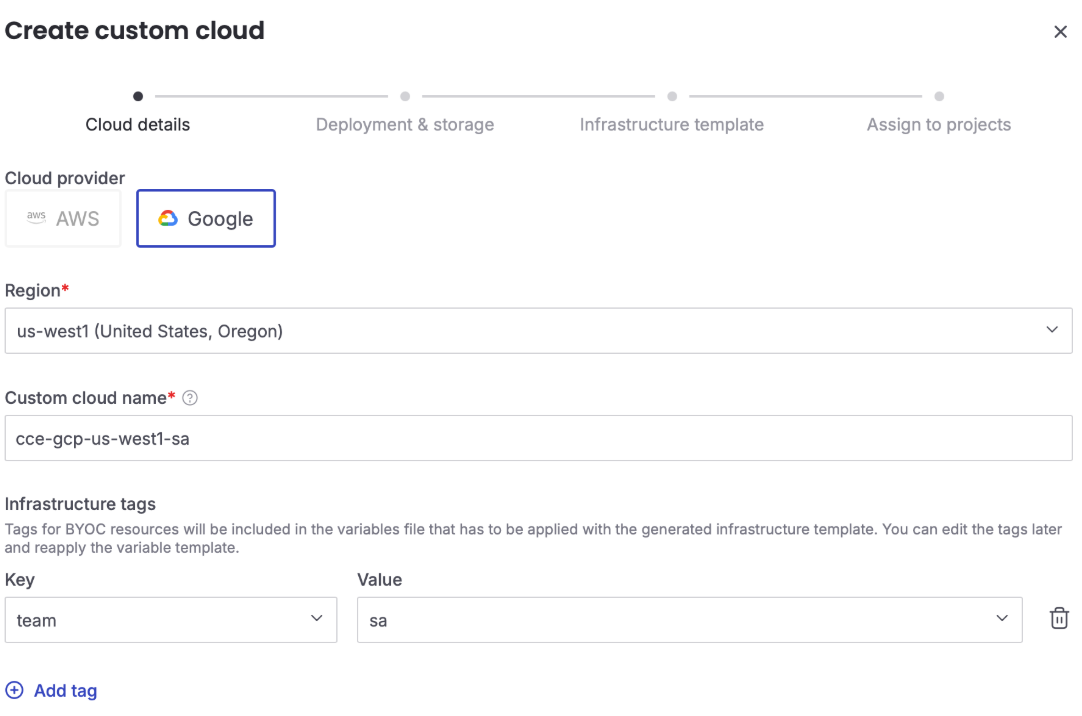
1. Pick cloud, region, and custom cloud name (your BYOC name)
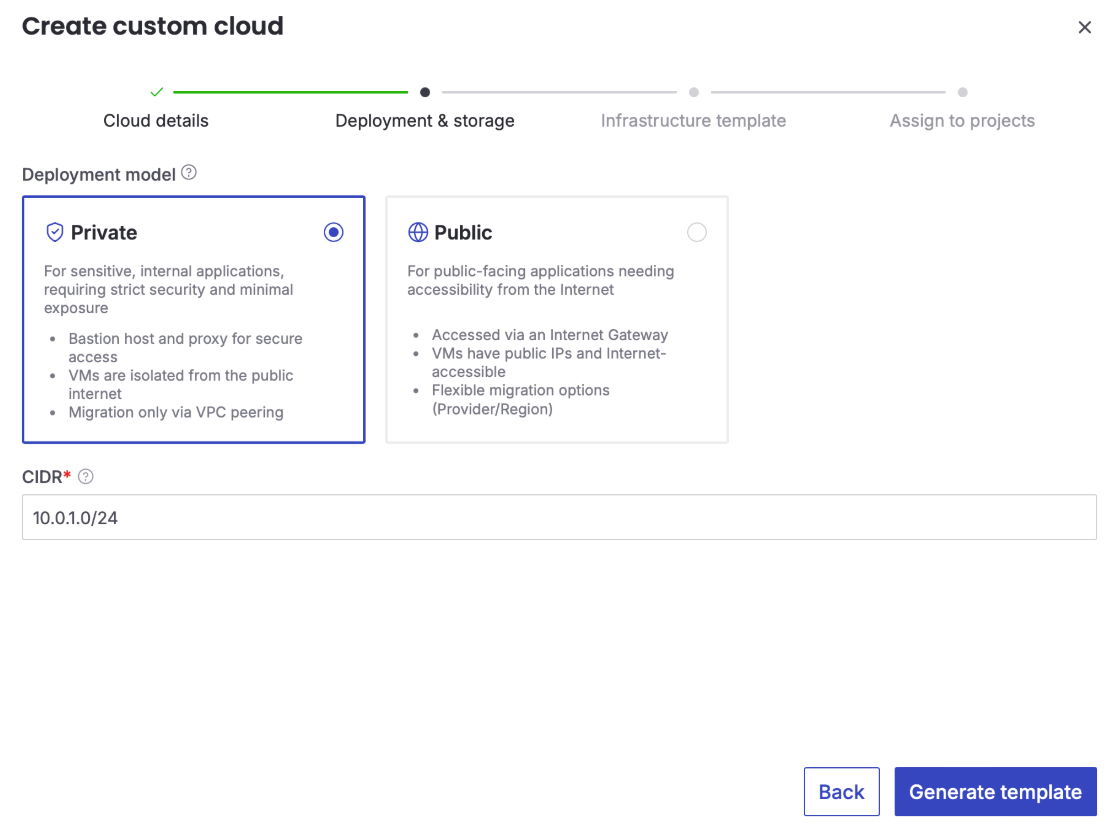
2. Provide custom cloud's CIDR range
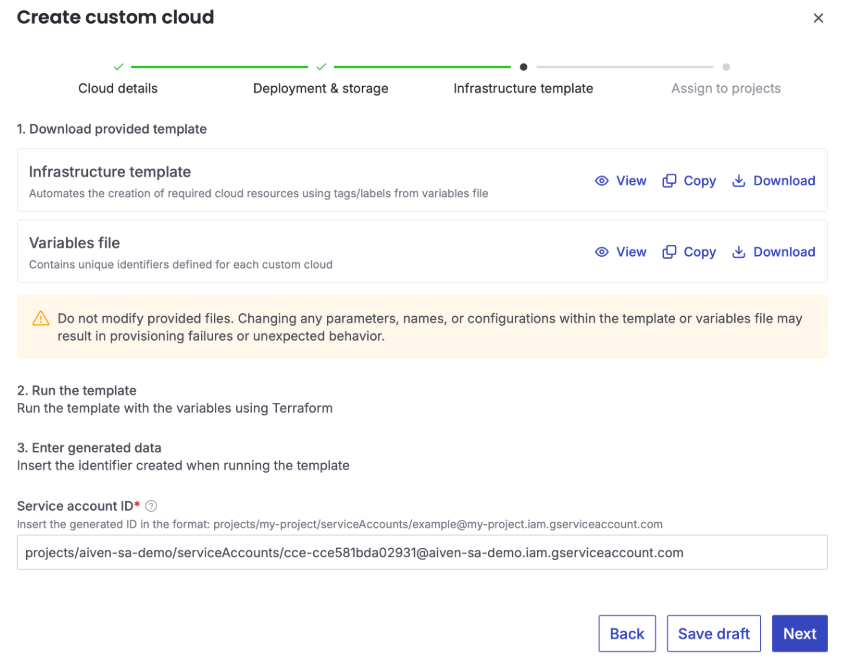
3. Download Aiven generated template, run the template, and enter generated Privilege-Limited Service Account
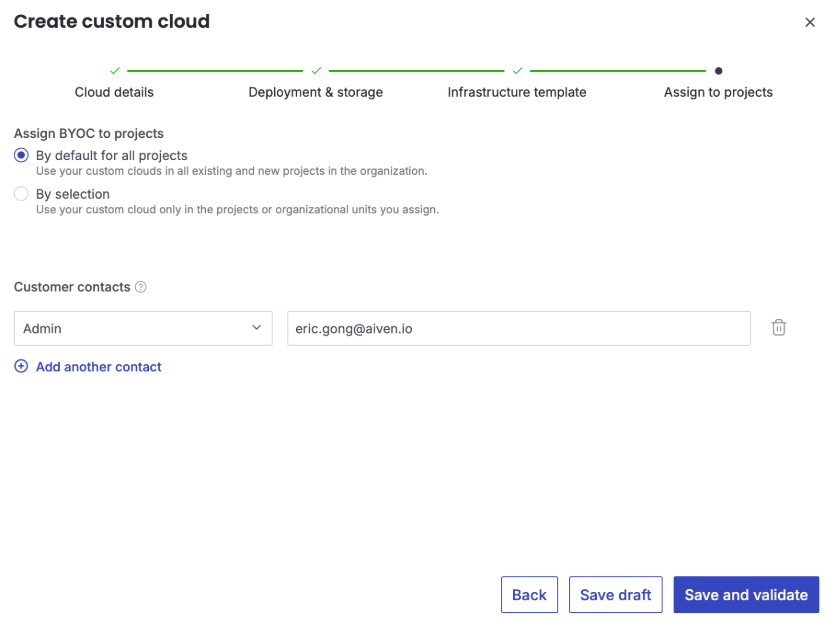
4. Assign BYOC to projects to be used
Streamlining infrastructure with Terraform
Aiven simplifies the deployment process by providing a guided setup as shown above within the Aiven Console to generate Terraform scripts. This automation ensures that your environment is built according to best practices without manual configuration errors.
The generated scripts perform several key functions:
- Network isolation: They create a dedicated VPC with two subnets, providing a clean separation for your data traffic.
- Traffic control: They automatically configure routing and firewall rules to support both private and public BYOC models.
- Handshake completion: Once the scripts are applied, you provide the generated Service Account ID back to Aiven to activate the custom cloud and assign your projects.
Limitation of the Privilege-Limited Service Account for Aiven
The Privilege-Limited Service Account created by you in this process can create and manage resources within the BYOC VPC but have intentionally limited other privileges for security purposes based on the least privilege principle.
While the customer uses high-level roles (like roles/owner or roles/resourcemanager.projectIamAdmin) to set up the infrastructure via Terraform, the Privileged-Limited Service Account itself is typically assigned more granular roles:
roles/compute.instanceAdmin.v1: For managing the lifecycle of service nodes and networks.roles/compute.securityAdmin: For managing firewall rules and network security of the bastion node.roles/iam.serviceAccountUser: Often granted to the Aiven platform to allow it to "act as" or impersonate this account.
The Privilege-Limited Service Account is designed with the following functional capabilities (can do):
- Compute and instance management: Required to create and manage the virtual machines (VMs) that serve as Kafka nodes.
- Networking infrastructure: Permissions to create and manage dedicated VPCs, configure subnets, and establish routing.
- Security and firewalls: Capabilities to define and manage firewall rules and security groups specifically for the Aiven service nodes.
- Storage access: Necessary permissions to manage the local or tiered storage used by some services.
Aiven's access is strictly scoped to prevent unauthorized changes to your broader GCP environment (can't do):
- No long-lived credentials: Aiven does not possess static keys; it uses short-lived tokens through impersonation.
- Restricted project access: The account cannot modify IAM policies for other users, access billing information, or interact with other projects not assigned to the custom cloud.
- VPC isolation: Aiven typically accesses these resources through a bastion proxy or a dedicated network bridge, ensuring workload nodes are not directly exposed.
Conclusion
Aiven BYOC on GCP offers a sophisticated solution for enterprises that require the security of their own cloud environment without the overhead of managing complex services. It provides a secure, automated, and high-performance path to modern data products.
Ready to build? Sign up for an Aiven account and deploy your first BYOC cluster on Google Cloud today. For more information, check out the Aiven for BYOC on GCP Documentation.
