
'%3e%3cpath%20d='M4.02991%2017.5H0.297321V5.81641H4.02991V17.5ZM2.16161%204.22266C0.968304%204.22266%200%203.26172%200%202.10156C0%201.54297%200.229018%201.01172%200.634821%200.617188C1.04062%200.222656%201.59107%200%202.16161%200C2.73214%200%203.28259%200.222656%203.68839%200.617188C4.0942%201.01172%204.32321%201.54688%204.32321%202.10156C4.32321%203.26172%203.35491%204.22266%202.16161%204.22266ZM17.996%2017.5H14.2714V11.8125C14.2714%2010.457%2014.2433%208.71875%2012.3308%208.71875C10.3902%208.71875%2010.0929%2010.1914%2010.0929%2011.7148V17.5H6.36429V5.81641H9.9442V7.41016H9.99643C10.4946%206.49219%2011.7121%205.52344%2013.5281%205.52344C17.3049%205.52344%2018%207.94141%2018%2011.082V17.5H17.996Z'%20fill='white'%20/%3e%3c/g%3e%3cdefs%3e%3cclipPath%20id='clip0_1338_1747'%3e%3crect%20width='18'%20height='20'%20fill='white'%20/%3e%3c/clipPath%3e%3c/defs%3e%3c/svg%3e)

'%3e%3cpath%20d='M14.3517%201.875H17.1883L10.9928%208.75781L18.2812%2018.125H12.5758L8.10396%2012.4453L2.99325%2018.125H0.152623L6.77807%2010.7617L-0.208984%201.875H5.64102L9.67896%207.06641L14.3517%201.875ZM13.3553%2016.4766H14.9263L4.78521%203.4375H3.09771L13.3553%2016.4766Z'%20fill='white'%20/%3e%3c/g%3e%3cdefs%3e%3cclipPath%20id='clip0_1338_1751'%3e%3crect%20width='18'%20height='20'%20fill='white'%20/%3e%3c/clipPath%3e%3c/defs%3e%3c/svg%3e)


TL;DR
Aiven for OpenSearch® is where you search logs from every service, with OpenSearch Dashboards included and a built-in integration for Aiven service logs. When several destinations need the same logs, or traffic bursts and mapping changes put logs at risk, put Aiven for Apache Kafka® in front: applications write once, Kafka buffers and replays, and sink connectors route logs to OpenSearch, object storage and Aiven for ClickHouse®. Every piece is configuration, not code, so you can start with OpenSearch alone and add Kafka later without touching your applications.
Many log setups start with each service shipping logs straight to a search cluster, which works for a while. Then volume increases, a new team wants the same logs in a different tool, a retention rule changes, and every one of those changes means redeploying log forwarders or touching application config.
In Observability is a data problem, we argued that logs, traces and metrics are just data, and they deserve the same architecture you give any other important data. This post applies that idea to the most common starting point: centralizing logs.
Put Apache Kafka® between whatever produces your logs and whatever searches them, and run your queries in OpenSearch®. Your applications write logs once, and the pipeline decides how they are filtered and where they go.
This pattern is for architects and platform teams that collect logs from many services and serve multiple downstream consumers. It lets you do three things: change where logs go without redeploying applications, absorb indexing spikes without dropping logs, and replay logs after a mapping or parsing change. If your logs go to one place and volume is steady, you can start with OpenSearch on its own and add Kafka when you need it, and this post covers that path too.
Buffer-and-route: Kafka in front of OpenSearch
Buffer-and-route splits log handling into three jobs, each owned by a different layer.
- Produce. Applications, log forwarders and services write logs to Kafka topics. They know one endpoint and nothing about where logs end up.
- Buffer. Kafka holds the stream for a retention window you set. If OpenSearch slows down, is upgraded or is resized, producers keep writing and nothing is dropped while the backlog fits in that window.
- Route. Consumers read the topics and deliver logs to destinations. OpenSearch gets the logs people search. Object storage gets the full archive. Aiven for ClickHouse® gets a copy for long-range analysis.
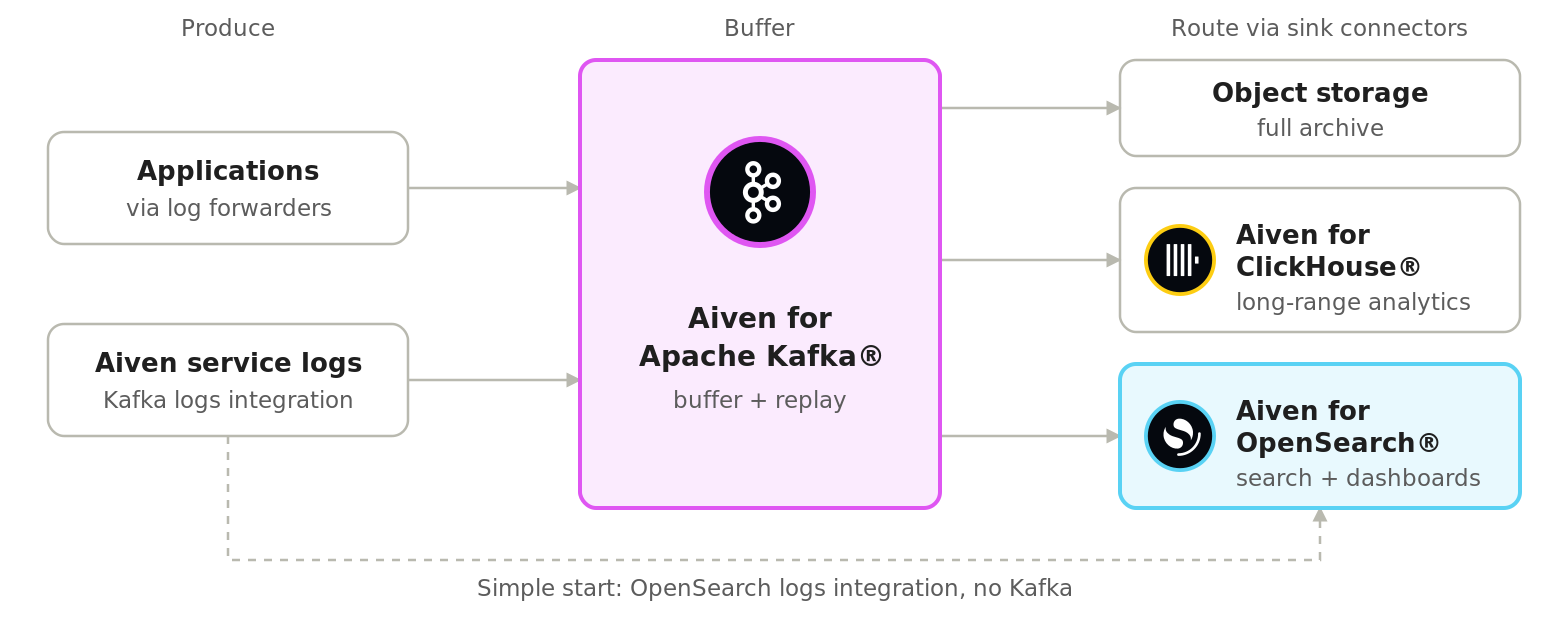
With the buffer in place, indexing spikes stop being outages, because OpenSearch catches up at its own pace instead of rejecting writes. After a mapping or parsing change, you replay the original logs from Kafka into a new index. Without Kafka, you either reindex from the cluster you're searching on, which adds load and recovers only what was indexed correctly, or accept that logs OpenSearch rejected are lost.
The routing layer is where every pipeline change happens. Want to drop debug logs from search but keep them in the archive? Add a second index for one noisy service? Send security events to a separate cluster with longer retention? Each of those is a change to a connector or a stream processor, and none of them touches application code.
The same routing layer handles multi-tenancy. Add the ExtractTopic transform from Aiven's open source transforms for Kafka Connect to the OpenSearch sink, and each record lands in its tenant’s index based on a tenant field. Per-tenant indexes keep tenants cleanly separated, but every index adds shards, so with many small tenants a shared index with a tenant field and document-level security scales better.
On Aiven, Kafka is a managed service like OpenSearch, so you don’t have to run or patch it yourself. With diskless topics in Aiven for Apache Kafka, you don't size storage either. Unlike classic Kafka topics, topic data goes to cloud object storage instead of broker disks, so there are no disks to provision or rebalance as log volume grows. Logs still reach search within seconds of being written, about 1.5 seconds at P99, fast enough for dashboards and incident investigations.
What Aiven gives you out of the box
On Aiven, each layer of the pattern is a managed service or a built-in integration, so the pipeline is configuration, not custom code. Four pieces do most of the work.
The OpenSearch logs integration sends Aiven service logs straight to OpenSearch. Enable it on any Aiven service and its logs land in daily indexes in your Aiven for OpenSearch service. You set two values: an index prefix (default logs) and an index retention limit in days (default 3, up to 10,000). OpenSearch deletes indexes older than the limit for you.
The Kafka logs integration sends the same service logs to a Kafka topic instead. Point it at a topic on Aiven for Apache Kafka and your platform logs join the same stream as your application logs, so they enter the buffer-and-route pattern too.
The OpenSearch sink connector moves logs from Kafka topics into OpenSearch. Aiven builds and maintains it as an open source project, so every piece of the pipeline, from Kafka to the connector to OpenSearch, is open source. Setup requires only three steps: enable Kafka Connect on your Kafka service (or use a dedicated Connect cluster), choose OpenSearch sink in the Aiven Console, and give it the topics to read and your OpenSearch connection details. For JSON logs, the integration is just configuration, not code:
Loading code...
By default, each topic lands in an index of the same name. For index rotation, the connector also writes to an existing index alias or to date-named indexes.
You can set up the OpenSearch logs integration, the Kafka logs integration and the OpenSearch sink connector through the Aiven Console, CLI, API, Terraform or the Kubernetes operator. Managing them in Terraform means a pipeline change becomes a reviewed pull request, not a redeploy of every service.
OpenSearch Dashboards is where people search the logs. Every Aiven for OpenSearch service comes with OpenSearch Dashboards, so there is a place to explore logs from the first day without running a separate UI. With Piped Processing Language in the Observability logs explorer, a question like "which services are producing the most errors right now?" becomes a short query:
Loading code...
Field names depend on how your logs are structured, so adjust them to match your index mappings.
For long-term retention, add an object storage sink connector. Configure the Amazon S3, Google Cloud Storage or Azure Blob Storage sink to read the same Kafka topics, the same way you set up the OpenSearch sink, and every log also lands in object storage. OpenSearch then keeps the window people search, and the archive keeps everything else, ready to load back when an investigation needs older logs. A later post will cover tiering and retention in depth.
When OpenSearch is enough on its own
If your situation fits the OpenSearch alone column, start there and add the buffer later. If any row fits the Add Kafka column, add it now:
| Consideration | OpenSearch alone | Add Kafka |
|---|---|---|
| Destinations | One: search | Several: search, an archive and analytics |
| Volume | Steady, with no large bursts during deploys or incidents | Bursts cause indexing rejections or force you to size OpenSearch for peak load |
| Replay | Not needed | Needed after a mapping change, an outage or a new parsing rule |
| Maintenance | Losing a few minutes of logs is acceptable | Logs must keep flowing while OpenSearch is upgraded or resized |
| Ownership | One team owns the logs | Application and platform teams change their logging on different schedules |
| Log sources | Aiven services, covered by the OpenSearch logs integration | Applications as well as Aiven services |
Starting with OpenSearch alone and adding Kafka as your needs change is a sensible approach. If you already run Aiven for Apache Kafka for application data, adding the buffer costs little. Because Aiven can send service logs to either OpenSearch or Kafka with an integration setting, moving to buffer-and-route later is a configuration change for platform logs. For application logs, the change happens in your log shipper, not your applications. Log forwarders such as Fluent Bit already support both outputs, so you add a Kafka output, run both while you verify, then remove the direct OpenSearch output. After that, every future change happens in the pipeline.
Building your log pipeline on Aiven
A log pipeline you can change without touching your apps starts with having them write to a stream. From there, everything else is routing. Kafka provides the buffer and the replay, OpenSearch provides the search, and Aiven's integrations and connectors turn the wiring between them into configuration you manage in Terraform.
Next in the series: Tracing with OpenTelemetry on OpenSearch®. Start from the first post: Observability is a data problem
Try it: Create an Aiven for OpenSearch service, load the sample web logs from the built-in demo datasets in OpenSearch Dashboards, and explore them in the Observability logs explorer. If you already run other Aiven services, enable the OpenSearch logs integration on one of them to search real logs from that service. Start free on Aiven
