
'%3e%3cpath%20d='M4.02991%2017.5H0.297321V5.81641H4.02991V17.5ZM2.16161%204.22266C0.968304%204.22266%200%203.26172%200%202.10156C0%201.54297%200.229018%201.01172%200.634821%200.617188C1.04062%200.222656%201.59107%200%202.16161%200C2.73214%200%203.28259%200.222656%203.68839%200.617188C4.0942%201.01172%204.32321%201.54688%204.32321%202.10156C4.32321%203.26172%203.35491%204.22266%202.16161%204.22266ZM17.996%2017.5H14.2714V11.8125C14.2714%2010.457%2014.2433%208.71875%2012.3308%208.71875C10.3902%208.71875%2010.0929%2010.1914%2010.0929%2011.7148V17.5H6.36429V5.81641H9.9442V7.41016H9.99643C10.4946%206.49219%2011.7121%205.52344%2013.5281%205.52344C17.3049%205.52344%2018%207.94141%2018%2011.082V17.5H17.996Z'%20fill='white'%20/%3e%3c/g%3e%3cdefs%3e%3cclipPath%20id='clip0_1338_1747'%3e%3crect%20width='18'%20height='20'%20fill='white'%20/%3e%3c/clipPath%3e%3c/defs%3e%3c/svg%3e)

'%3e%3cpath%20d='M14.3517%201.875H17.1883L10.9928%208.75781L18.2812%2018.125H12.5758L8.10396%2012.4453L2.99325%2018.125H0.152623L6.77807%2010.7617L-0.208984%201.875H5.64102L9.67896%207.06641L14.3517%201.875ZM13.3553%2016.4766H14.9263L4.78521%203.4375H3.09771L13.3553%2016.4766Z'%20fill='white'%20/%3e%3c/g%3e%3cdefs%3e%3cclipPath%20id='clip0_1338_1751'%3e%3crect%20width='18'%20height='20'%20fill='white'%20/%3e%3c/clipPath%3e%3c/defs%3e%3c/svg%3e)


TL;DR
-
PostgreSQL supports four distinct text search methods for searching text in PostgreSQL: iLIKE, full-text search with tsquery/tsvector, trigram search via pg_trgm, and vector search with pgvector.
-
iLIKE gives you fast, case-insensitive exact matches with no extra setup, but it can't handle misspellings or find similar words.
-
Trigram search, built on the pg_trgm extension, splits text into three-character sequences and excels at catching misspellings and word fragments.
-
Vector search converts text into embeddings and finds results by meaning, so a query for "physician" returns shows about doctors even without a shared keyword.
-
Choosing the right method depends on your data and how your users actually search, and Aiven for PostgreSQL runs all of them without extra infrastructure.
When it comes to text search, PostgreSQL offers a surprisingly rich set of tools. Initially, text search capabilities were quite basic, often relying on the LIKE operator. This is inefficient for large amounts of text and lacks the nuance that comes with language.
A major breakthrough came with the introduction of the built-in tsquery and tsvector data types, along with the associated functions, as part of PostgreSQL's core distribution. But tsquery is not the only option.
I like to think of this like seeing a doctor. You can go to a family doctor and they can help you with most things. For specific results, it’s better to see a specialist who has a better understanding of the particular issue.
Search is the same way. At the end of the day, you get results but what you put into your search will affect what you get. That said there are some search methods that work better than others depending on your data.
Let’s explore a small dataset of 25 doctor-based tv shows and see what different search challenges match up.
- Searching for an exact answer (doctor)
- Searching for a word fragment (Doc)
- Capitalization (Doctor)
- Singular/Plural (Doctors)
- Phrase Matching (time travelling doctor)
- Similar Text Matching (physician)
I've made a Github repo that you can walk through along the code samples in this post - https://github.com/aiven-labs/pg-text-search-comparisons
This was inspired and learned a great deal about these techniques from our Elephant in the Room Episode 1 on YouTube. This guide aims to summarize and detail how to implement these methods effectively.
iLIKE shouldn’t always be avoided
Using LIKE/iLIKE in your queries may seem laughable in 2025, but in reality, it’s the lightest and easiest way to retrieve consistent data.
iLIKEis the case insensitive version ofLIKE. Youshould use iLIKE unless casing matters.

iLIKE is particularly useful for finding specific shows when you need a simple, fast, and exact match that ignores capitalization. For example, if you are looking for "Grey's Anatomy" using iLIKE 'Grey''s Anatomy' or even iLIKE '%Grey''s%' is highly efficient.
Loading code...
While testing this a funny thing happened which actually shows the problem with iLike. I made a mistake and wrote Gray’’s Anatomy instead of Grey’’s Anatomy. There were no results for that.
Loading code...
You can also chain iLIKEs with OR.
Loading code...
So if you are confident in your knowledge of the data and your query you can use iLIKE pretty reliably.
| Support | Search Type | Notes |
|---|---|---|
| ✅ | Searching for an exact answer (doctor) | |
| ✅ | Searching for a word fragment (Doc) | |
| ✅ | Capitalization (DOCTOR) | |
| ⛔ | Misspelling | |
| ⚠️ | Singular/Plural | If you use % and shorten the phrase to catch the plural with the wildcard |
| ⛔ | Shortening (Dr.) | |
| ⚠️ | Phrase Matching | ONLY if you get the exact phrase |
| ⛔ | Similar Text Matching (physician) |
TSQuery and TSVector
The core of PostgreSQL's native Full-Text Search (FTS) relies on the tsvector and tsquery data types. A tsvector is created by parsing a document, converting words to dictionary-normalized root forms, and discarding common stop words (and, or, in, etc). A tsquery represents the user's search phrase. The tsquery is similarly processed and may include boolean operators (AND, OR). The search compares the roots of the query and the vector.
Note that you are searching the tsvector, not the content itself. This means that information needs to be generated and possibly stored. To improve performance you can create a generalized inverted (GIN) index on that data. This means more data stored than if you used iLIKE.
Loading code...
As you can see you can add multiple files to search and your index would depend on that. You can also configure things like the language (for stem and lexing definitions), and the weight of how much value to give each field (for instance the name of the show could be more valuable to you than matching in the description). You can generate this information on the fly (obviously there would be performance questions).
Let’s pause and talk about similarity.
When you run a query you are not getting results in a boolean feature (exists or not) instead, you are performing a distance query. We’ve talked about this in more detail in our Image recognition with Python, OpenCV, OpenAI CLIP and pgvector guide. But basically your distance is how close your query is to the data plus any weights that you use to manipulate the score.
Loading code...
Each of these searches found the phrase (we used ts_headline to mark the result with <b>RESULT</b>). If we change our query to “personal relationship” what happens?
Loading code...
But we just had so many results… What Happened? The query above is only looking for the phrase “Personal Relationships”. There are a few ways to make it look for each individual word. The most common is to use the tsquery search operators & (AND), | (OR), ! (NOT), and <-> (FOLLOWED BY).
Loading code...
Full text search seems to be most beneficial when you know how you want searches to happen.
| Support | Feature | Notes |
|---|---|---|
| ✅ | Searching for an exact answer (doctor) | |
| ⚠️ | Searching for a word fragment (Doc) | needs to_tsquery(‘Doc:*’) |
| ✅ | Capitalization (DOCTOR) | |
| ⛔ | Misspelling (Dotcor) | |
| ⚠️ | Singular/Plural (Doctors) | Only works in catching “Doctors” with the query “Doctor” |
| ⛔ | Shortening (Dr.) | |
| ⚠️ | Phrase Matching (“time travelling doctor”) | ONLY if you get the exact phrase |
| ⛔ | Similar Text Matching (physician) |
Trigram Search
Trigram search handles similarity similar to tsquery/tsvector but instead finds the distance between trigrams of the content. A trigram is a sequence of three consecutive characters taken from a string (leading adn trailing spaces are added for more flexibility). For example, the word "Doctor" contains the trigrams: ' Do','Doc', 'oct', 'cto', 'tor', 'or '.
By comparing the set of trigrams between a search query and the text in your database, PostgreSQL can calculate a similarity score. This is enabled by the pg_trgm extension.
Loading code...
similarity(text, text) returns a score between 0 and 1 (like Full Text Search). This score indicates the degree of similarity between two text strings, calculated based on the number of shared trigrams. A higher score signifies a greater degree of similarity between the two input strings, making it an excellent feature for tasks like finding approximate matches or detecting near-duplicates.
There are two basic matching operators for pg_tgrm, % and %>. The percent is a character-level match and compares the entire string of content against your search term. This is great if you are trying to match a field in its entirety but doesn’t work well when trying to find a section in the content. The second is a word-level match which will look for matches in one or more words. For full text search you will most likely need to use the word-level search.
Each of these searches look for distance like the others but pg_trgm has the ability to filter out results below a set threshold operator. You can adjust the thresholds for both pg_trgm.similarity_threshold and pg_trgm.word_similarity_threshold. The lower the number the looser the match will be.
When I was messing with the thresholds, I was able to get the search term “Doctor” to find “Dr.”. That said when I searched for Docter I also got matches for many other words that were not doctor or doctor related.
pg_trgm.strict_similarity_threshold has a tighter scoring threshold that could help reduce false matches.
Below I compared pg_trgm.similarity_threshold with pg_trgm.strict_similarity_threshold to see how “Docter” (an intentional misspelling) scored compared with both thresholds set to “0.5”.
Loading code...
The trigram approach offers excellent handling of misspellings and is good for finding similar words or fragments without the need for wildcards. It’s simple to implement using the pg_trgm extension. However, its main drawback is semantic weakness, as it treats all words equally, lacking the ability to understand language rules like stemming or ignore stop words, which can reduce the relevance of results in longer documents.
That said it’s generally a simple upgrade from our `tsvector`-based search, but also requires more thought in how users are searching your data.
| Support | Challenge | Notes |
|---|---|---|
| ✅ | Searching for an exact answer (doctor) | |
| ✅ | Searching for a word fragment (Doc) | |
| ✅ | Capitalization (DOCTOR) | |
| ✅ | Misspelling (Dotcor) | This is its strength. |
| ✅ | Singular/Plural (Doctors) | Yes, due to high character overlap |
| ⛔ | Shortening - (Dr.) | Weak, low character overlap with "Doctor" |
| ⚠️ | Phrase Matching ("time travelling doctor") | Yes, but scores are based on the whole phrase similarity. |
| ⛔ | Similar Text Matching (physician) | Can return matches, but often requires a lower similarity threshold. Which adds too much noise |
Vector Search
Vector search (or Semantic Search) is a monumental shift in how we approach text retrieval. Instead of matching keywords or character sequences, vector search attempts to understand the meaning or intent of the query.
This is achieved by converting text into high-dimensional numerical arrays called embeddings (vectors). Text with similar meaning will have vectors that are numerically "close" to each other in the vector space.
PostgreSQL can perform vector search with the pgvector extension.
Just like with tsvector search you are trying to calculate the distance between the vectors of your content and your query. Unlike tsvector search, there isn’t a way to calculate the vectors inside of PostgreSQL. This means that you will need to use an outside service to generate the vector embeddings. This can be done with code, one of the LLM APIs or a tool like n8n.
Let’s alter our table to add the pgvector extension and alter our table to store our embeddings… We will be using the nomic-embed-text model which will create 768 floating point numbers as your embedding.
It’s most important your embedding model is the same for your content and your query.
Loading code...
Let’s explore the code below using Ollama installed locally:
Loading code...
We should now be able to see our vectors
Loading code...
Now we can search against our content.
Loading code...
Searching for content like “Doctor”, “DOCTOR”, “Doc”, “Dr.” seems to give similar positive results. Misspellings were hit or miss but would work with some minor tweaks to the ranking. What was fantastic was that you could search for some abstract ideas… I could get results for The Good Doctor, a show about a talented physician diagnosed with autism spectrum disorder using the query “mental disorder” and even “adhd”.
Those results are due to the nature of searching by embeddings. This has some strange side effects. Like with the rank of .98. If you searched for “cook”... Doc Martin shows up. I’m not sure why but likely “cook” pulls close enough to something in the description. Perhaps it’s Doc’s name.
“A British comedy-drama following Dr. Martin Ellingham, a retired neurosurgeon who moves to a small coastal village in Devon and becomes the local doctor.”
Vector search creates better results when the query is structured like the content so “A time traveling doctor who goes on adventures” is going to have better results than “time travel”.
There is much to learn when it comes to pgvector. Pgvector requires the generation of all these vector embeddings and the search itself is not the fastest solution. One strategy is to generate indexes that will increase performance. Pgvector out of the box supports HNSW and IVFLAT. You can also add pgvectorscale which promises better compression and performance with DiskANN indexing.
The ability to search for intent rather than just keywords makes this the most powerful method for answering complex or conceptual questions. It also can surprise you with results that are not an obvious match but are close based on the context of the content.
| Support | Challenge | Notes |
|---|---|---|
| ✅ | Searching for an exact answer (doctor) | |
| ⚠️ | Searching for a word fragment (Doc) | The context is more important that matching strings |
| ✅ | Capitalization (DOCTOR) | |
| ⚠️ | Misspelling (Dotcor) | Minor and common Misspellings are often caught |
| ✅ | Singular/Plural (Doctors) | |
| ✅ | Shortening - (Dr.) | Yes, the model understands the semantic link between "Dr." and "Doctor." |
| ✅ | Phrase Matching ("time travelling doctor") | Yes, understands the meaning of the phrase. |
| ✅ | Similar Text Matching (physician) | EXCELLENT. The strength of vector search. A search for 'physician' would return all 'Doctor' shows. |
The Final Results
The tables may paint a clear picture but we didn’t talk about storage and performance. That is because there are several indicators that can make any of these the correct answer. In fact here is a full infographic that does include those thoughts.
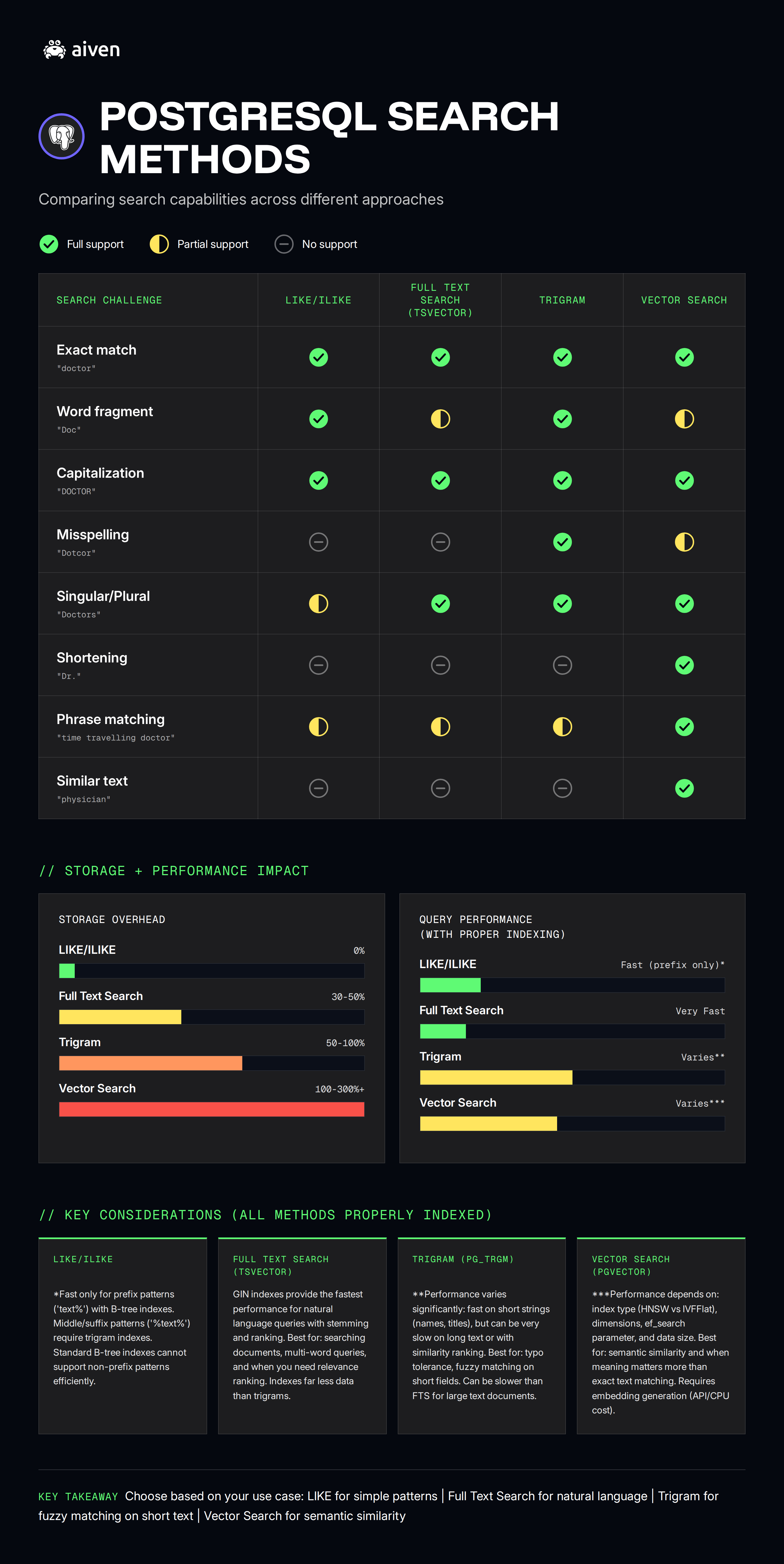
Looking back at our Elephant in the Room experiment, we never got a clear answer as to which solution would work best. It only showed us that searching for the same thing with different search types and settings gave us an array of different results. This is why it’s important to understand how your users will search for your information. This will lead you to optimizing for a better result.
There is one last option which is hybrid search, a combination of one or more of these search types. While this is an option, I believe this is where we start posing the question - are we using the right tool for the job? Aiven for Opensearch is a dedicated search solution that can perform all of these search types and more (even at the same time) out of the box with little configuration needed.
I don’t believe the answer is to reach for another service immediately. You can do things like partition your data to make your search windows smaller. You can also collect information on how your customers are querying data and then choose your search type based on your findings. But if you have optimized your Aiven for PostgreSQL instance and you’re still trying to eke out more performance, using a dedicated system may be the correct answer. But for all else, you hopefully have a better understanding of how these search types work and when they should be implemented.
Check out the Repo and follow along with an free Aiven for PostgreSQL database.
