Configure AZ-aware listeners for diskless topics
Use availability zone (AZ)-aware listeners to reduce cross-AZ network traffic between your clients and diskless topics in Aiven for Apache Kafka®.
Cloud providers typically charge for data transferred between availability zones. In bring your own cloud (BYOC) deployments, you pay these charges directly. Diskless topics remove cross-AZ replication traffic, but producers and consumers still generate cross-AZ traffic when they connect to brokers in another AZ.
With AZ-aware listeners, each AZ has its own set of listeners, which are Kafka ports that
accept client connections. You connect clients to an AZ-specific Kafka endpoint, without
changing their client.id. Kafka then routes diskless-topic requests to a broker in that
AZ, if one is available.
Choose an AZ-aware routing method
Aiven for Apache Kafka supports two methods for routing diskless-topic traffic to brokers in the client's AZ. You can choose a method for each client and use both methods in the same deployment.
| Method | Use when | How to configure |
|---|---|---|
client.id | You can change the client ID, or your clients connect through PrivateLink. | Append diskless_az and the AZ to client.id. |
| AZ-aware listeners | You need to keep the original client.id unchanged, for example, generated Kafka Connect client IDs, or IDs that quotas, metrics, or logs depend on. | Set bootstrap.servers to an AZ-specific endpoint. |
Adding diskless_az to client.id changes the client ID, which can affect quotas,
metrics, and logs that depend on its exact value.
For example, to specify the use1-az1 AZ using client.id:
client.id=my-producer,diskless_az=use1-az1
How AZ-aware listeners work
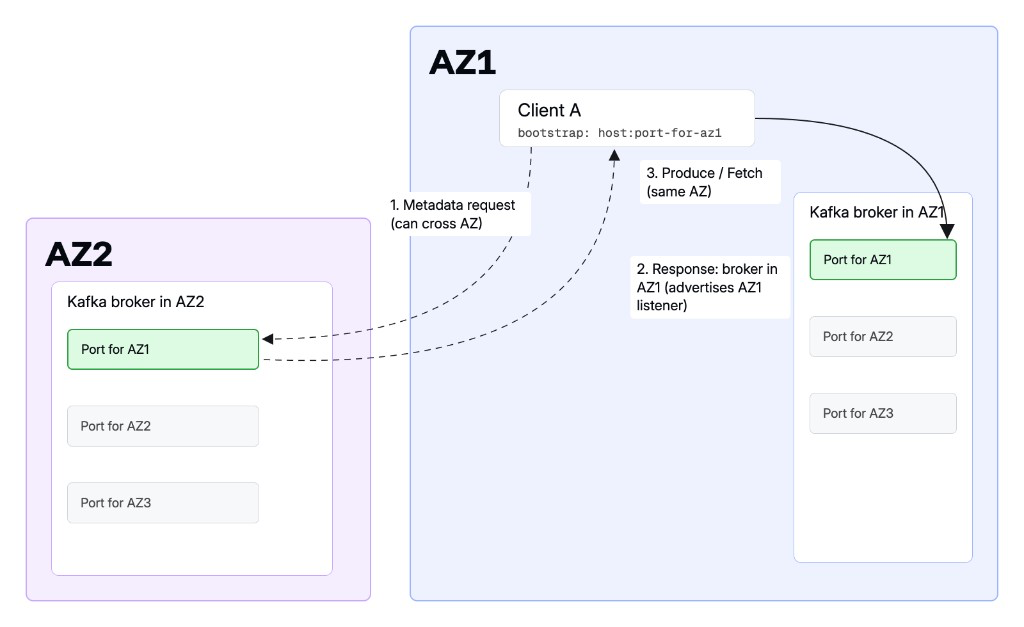
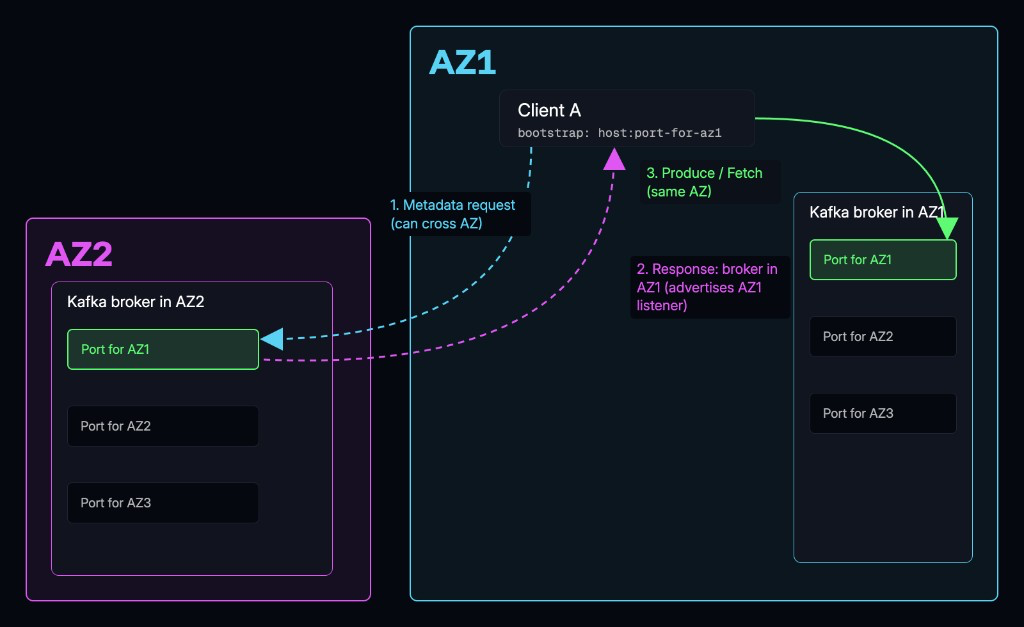
AZ-specific endpoints use the same hostname as the default Kafka endpoint, but each AZ, authentication method, and access route has its own port. Find the default endpoints in Connection information on the service Overview page. Every Kafka broker exposes the AZ-specific endpoints, regardless of which AZ it runs in.
When a client connects through an AZ-specific endpoint:
- The client sends a metadata request to find out which brokers to use for each partition. The request can reach a broker in any AZ.
- The broker identifies the AZ from the port the client connected to.
- For diskless topics, the broker returns metadata directing the client to a broker in that AZ, when one is available.
- The client sends subsequent produce and fetch requests to that broker.
If you use more than one AZ-routing method, the broker selects the AZ in the following order:
- The
diskless_azvalue inclient.id, if specified. - The AZ associated with the endpoint the client connects through.
- Default routing, if neither method specifies an AZ.
If no broker runs in the selected AZ, Kafka routes requests to a broker in another AZ. The client keeps producing and consuming without configuration changes, but traffic crosses AZ boundaries. An AZ-specific endpoint can remain after all brokers leave that AZ.
Prerequisites
- An Aiven for Apache Kafka service with diskless topics enabled.
- AZ-aware listeners enabled for your project. Contact your Aiven account team to enable the feature.
- The Aiven CLI or access to the Aiven API to find the AZ-specific endpoints.
- Firewall rules and allowlists that permit the AZ-specific Kafka ports. To find them, see Find the AZ-specific Kafka endpoint.
AZ-aware listeners apply to every Aiven for Apache Kafka service with diskless topics in the project. Aiven applies the change with a rolling restart of the brokers.
To check whether a service has AZ-specific endpoints, run the command in Find the AZ-specific Kafka endpoint. If the command returns no AZ-specific endpoints after the feature has been enabled, contact your Aiven account team or Aiven support.
Limitations
- Diskless topics only: AZ-aware listeners don't affect classic topics. To reduce cross-AZ traffic for classic-topic consumers, use follower fetching.
- PrivateLink: AZ-aware listeners don't work with PrivateLink connections. Add
diskless_azto yourclient.idinstead. - Broker placement: Routing to an AZ requires a broker in that AZ. Use preferred availability zones to influence broker placement. Placement isn't guaranteed.
Configure AZ-aware listeners
Identify the client's availability zone
Find the AZ where your Kafka producer or consumer runs.
- AWS
- Google Cloud
On an Amazon EC2 instance, use Instance Metadata Service Version 2 (IMDSv2) to get the AZ ID:
TOKEN=$(curl -fsS -X PUT \
  "http://169.254.169.254/latest/api/token" \
  -H "X-aws-ec2-metadata-token-ttl-seconds: 21600")

curl -fsS \
  -H "X-aws-ec2-metadata-token: $TOKEN" \
  "http://169.254.169.254/latest/meta-data/placement/availability-zone-id"
Example output:
use1-az1
Use AZ IDs such as use1-az1, not AZ names such as us-east-1a, because AWS can map the
same AZ name to different physical AZs in different accounts. For more information, see
Zone ID formats.
On a Google Compute Engine instance, retrieve the AZ name:
curl -fsS \
  -H "Metadata-Flavor: Google" \
  "http://metadata.google.internal/computeMetadata/v1/instance/zone" |
awk -F/ '{print $NF}'
Example output:
europe-west1-b
Find the AZ-specific Kafka endpoint
Use the Aiven CLI or API to retrieve the AZ-specific endpoints. The examples use
jq to filter the response.
- CLI
- API
Retrieve the endpoints with the Aiven CLI:
avn service get SERVICE_NAME \
  --project PROJECT_NAME \
  --json |
jq -r '.components[]
  | select(.component == "kafka" and .az != null)
  | [.az, .route, .kafka_authentication_method, .kafka_ssl_ca,
     "\(.host):\(.port)"]
  | @tsv'
Replace the following:
SERVICE_NAME: Name of your Aiven for Apache Kafka service.PROJECT_NAME: Name of your Aiven project.
Use the ServiceGet API operation:
curl --silent \
  --header "Authorization: Bearer API_TOKEN" \
  "https://api.aiven.io/v1/project/PROJECT_NAME/service/SERVICE_NAME" |
jq -r '.service.components[]
  | select(.component == "kafka" and .az != null)
  | [.az, .route, .kafka_authentication_method, .kafka_ssl_ca,
     "\(.host):\(.port)"]
  | @tsv'
Replace the following:
API_TOKEN: Your Aiven API token.PROJECT_NAME: Name of your Aiven project.SERVICE_NAME: Name of your Aiven for Apache Kafka service.
Each row shows an endpoint's AZ, network route, authentication method, certificate
authority (CA), and host:port. An AZ can have several endpoints, depending on the
enabled authentication methods and routes.
Example output:
europe-west1-b  dynamic  certificate  project_ca   kafka.example.com:31084
europe-west1-b  dynamic  sasl         project_ca   kafka.example.com:31096
europe-west1-b  dynamic  sasl         letsencrypt  kafka.example.com:31108
europe-west1-c  dynamic  certificate  project_ca   kafka.example.com:31085
europe-west1-c  dynamic  sasl         project_ca   kafka.example.com:31097
europe-west1-c  dynamic  sasl         letsencrypt  kafka.example.com:31109
The route field shows the network access route:
dynamic: The default hostname. For services in an Aiven VPC, it resolves to a private IP address and supports VPC peering.public: Public internet access to a service in an Aiven VPC.private: Private connectivity for BYOC and partner VPC deployments.
The kafka_ssl_ca field shows whether the endpoint uses the Aiven project CA (project_ca)
or Let's Encrypt (letsencrypt).
If no row matches your client's AZ, keep using the default Kafka endpoint. Otherwise,
select an endpoint that matches your client's AZ, network route, authentication method,
and CA. Use its host:port value when configuring your Kafka client.
On AWS, the az value is an AZ ID such as use1-az1. Match it to the AZ ID that the
instance metadata service returns.
Configure the Kafka client
-
Set
bootstrap.serversto the endpoint matching your client's AZ:bootstrap.servers=kafka.example.com:31084 -
Keep your existing authentication settings and
client.idunchanged.If
client.idcontainsdiskless_az, ensure that it specifies the intended AZ. This value takes precedence over the AZ-specific endpoint and can route traffic to a different AZ. -
Connect your client and confirm that it can produce or consume records for a diskless topic.
Verify AZ-local routing
To verify AZ-local routing, monitor the Kafka broker-topic metrics for your diskless topic
and confirm that brokers in the client's AZ handle produce or fetch requests. Metrics
such as TotalProduceRequestsPerSec and TotalFetchRequestsPerSec can show which broker
handles requests for the topic. For more information, see
Observability and monitoring.
In BYOC deployments, you can also monitor cross-AZ data transfer in your cloud provider's network metrics or billing data.
Use AZ-aware listeners with Kafka Connect and MirrorMaker 2
Aiven-managed services
When AZ-aware listeners are enabled for your project, you don't need to change connector configurations or replication flows. Aiven updates the Aiven for Apache Kafka Connect and Aiven for Apache Kafka MirrorMaker 2 services integrated with your Kafka service so that each node uses the endpoint for its own AZ. Applying the change can restart the Kafka Connect or MirrorMaker 2 nodes.
If the node's AZ is unknown or no matching endpoint exists, the node uses the default Kafka endpoint. To reduce cross-AZ traffic, deploy integrated services in the same region as your Kafka service.
If AZ-aware listeners aren't enabled, Aiven for Apache Kafka MirrorMaker 2 can use the
diskless_az client ID method instead. Set diskless_az_enabled on the replication flow.
For instructions, see
Route diskless topic traffic within an availability zone.
Self-managed deployments
For self-managed Kafka Connect and MirrorMaker 2 deployments, configure workers in each AZ to use the AZ-specific Kafka endpoint for that AZ.
For Kafka Connect, set bootstrap.servers in the connect-distributed.properties file:
bootstrap.servers=AZ_SPECIFIC_HOST:AZ_SPECIFIC_PORT
For MirrorMaker 2, set the bootstrap endpoint for the relevant Kafka cluster in the
mm2.properties file:
CLUSTER_ALIAS.bootstrap.servers=AZ_SPECIFIC_HOST:AZ_SPECIFIC_PORT
Replace the following:
AZ_SPECIFIC_HOST: Hostname of the AZ-specific endpoint for the worker's AZ.AZ_SPECIFIC_PORT: Port of the AZ-specific endpoint for the worker's AZ.CLUSTER_ALIAS: Alias of the diskless Kafka cluster in your MirrorMaker 2 configuration.
Troubleshoot AZ-aware routing
Client uses an endpoint for a different AZ
If a client connects through an endpoint for another AZ, Kafka can route its diskless-topic requests across AZ boundaries without returning an error.
Ensure that bootstrap.servers uses the endpoint for the client's AZ. If client.id
contains diskless_az, ensure that the value specifies the intended AZ. The diskless_az
value takes precedence over the endpoint's AZ. For more information, see
How AZ-aware listeners work.
Endpoints after scaling
AZ-specific ports remain stable during scaling and broker replacement. However, the set of AZs that currently contain brokers can change. If this happens, run the checks in Verify AZ-local routing again.
Related pages